Faster Payments System
Overview
Introduction
Faster Payments System is a payment method which allows you to process payments in rubles by using bank accounts in Russia. This method supports one-time purchases, refunds and payouts. In addition, the implementation of credential-on-file purchases is in development.
This article provides information about working with the Faster Payments System method: general insights are presented in the Overview section, while information about the actions required to process payments and perform other actions is presented in the sections that follow.
General information
| Payment method type | Bank payments |
|---|---|
| Payment instruments | Bank accounts |
| Countries and regions | RU |
| Payment currencies | RUB |
| Currency conversion | – |
| One-time purchases | + |
| Credential-on-file purchases | + |
| Full refunds | + |
| Partial refunds | – |
| Payouts | + |
| Chargebacks | – |
| Notes | two options for making payouts are available—with additional confirmation by the merchant and without it; the specific option for each project is set by EtoPlatezhi technical support |
| Onboarding and access fee | refer to your EtoPlatezhi account manager |
Interaction diagram
Payment processing by using the Faster Payments System method involves the merchant's web service, one of EtoPlatezhi interfaces, the EtoPlatezhi payment platform, and technical facilities of the provider service.
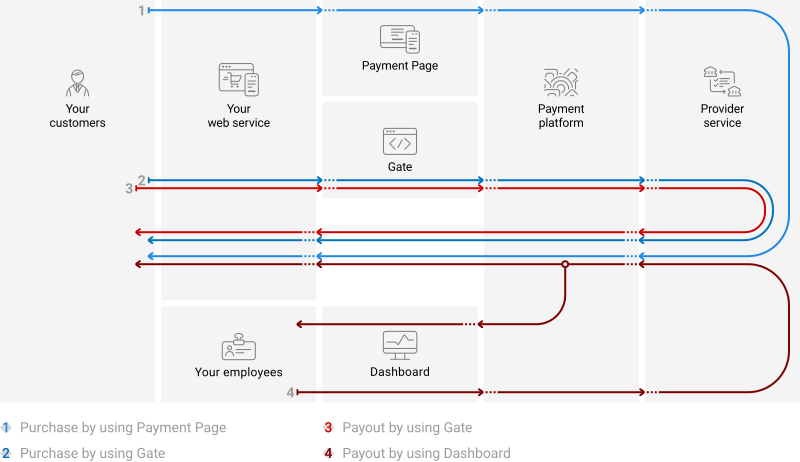
Operations support
Various platform interfaces can be used to process payments and perform operations using the Faster Payments System method. Purchases can be processed by using Payment Page, Gate and Dashboard (using payment links), refunds and payouts—by using Gate and Dashboard. At the same time, regardless of the interfaces used, the following properties and limitations are applicable.
The following properties and limitations apply to the Faster Payments System method.
| Amounts, RUB ¹ | Times ² | |||
|---|---|---|---|---|
| minimum | maximum | base | threshold | |
| Purchases | 1.00 | 1,000,000.00 | 1 minute | * |
| Refunds | 1.00 | 1,000,000.00 | 1 minute | * |
| Payouts | – | 1,000,000.00 | 1 minute | 13 hours |
- Additional limits can be imposed by banks.
- The base and threshold times are defined as follows:
- The base time is the average estimated time between the moment a payment is initiated in the payment platform to the moment the payment result is sent to the web service. The base time evaluation is made on the assumption of normal operation of all technical facilities and communication channels and typical customer behaviour (if any input from the customer is required). Use the base time to estimate when to react to the absence of payment result callbacks or when to check payment status (details).
- The threshold time is the maximum possible time between the moment a payment is initiated in the payment platform to the moment the web service receives the callback with the payment result. A payment is automatically assigned the
declinestatus if it wasn't processed within the threshold time. For individual customisation of the threshold time limit, contact EtoPlatezhi technical support.
Processing scenarios
To perform a purchase by using the Faster Payments System method, you need to redirect the customer to the Faster Payments System service, while to make a refund, you need to receive a request from the customer and notify the customer about the result of the refund via the web service. To process a payout, you need to notify the customer via the web service.
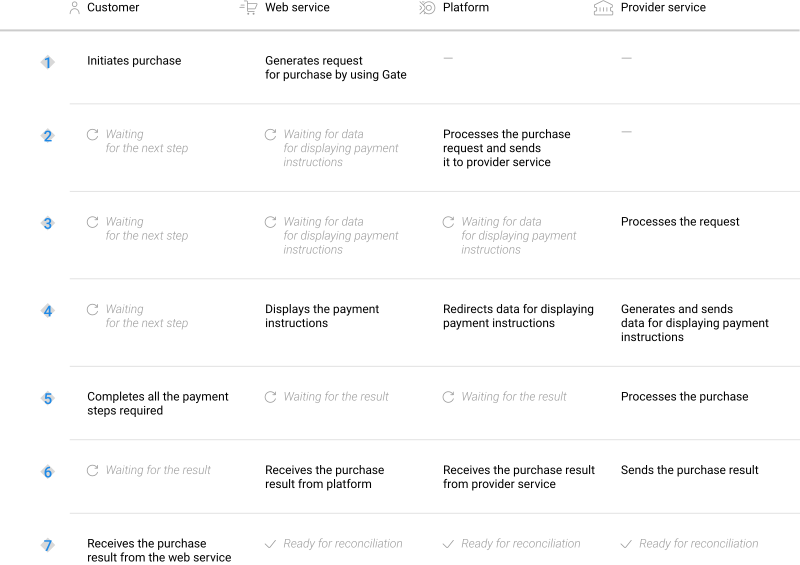
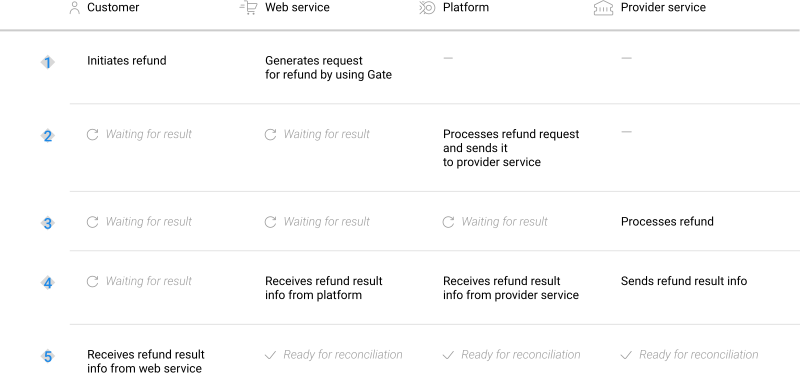
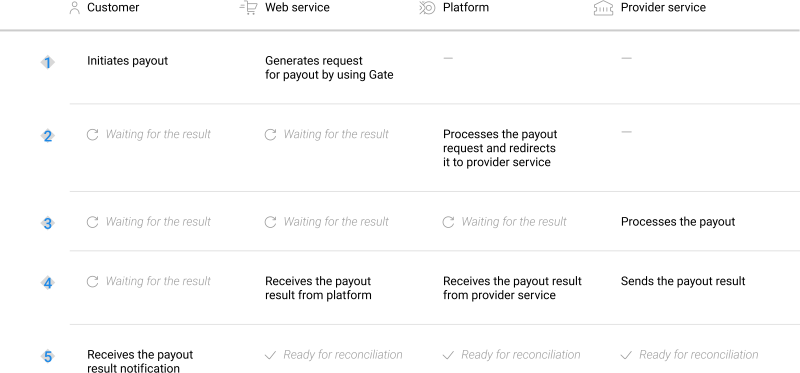
The specifics of working with the method include the necessity of selecting a bank for each payout. When payouts are initiated through Gate, the bank must be selected on the side of the web service and the identifier of this bank must be specified in requests.
Supported banks
Since the list of available banks may change over time, it is recommended to send a POST request to the /v2/info/banks/sbp-qr/payout/list endpoint to obtain up-to-date information. This endpoint belongs to the /v2/info/banks/{payment_method}/{operationType}/list group of the Gate API.
The request must contain the project and payment identifiers, signature, currency code, and payment amount, as shown in the example. Specify real payment data if possible. However, random values are also allowed.
{
    "general": {
        "project_id": 200,
        "payment_id": "ORDER_155860015",
        "signature": "K6jllym+PtObocZtr345st...=="
    },
    "payment": {
        "amount": 1000,
        "currency": "RUB"
    }
}
[
  {
    "id": 55131, // Bank ID
    "abbr": "SBER", // Bank abbreviation (for internal use)
    "name": "Sberbank", // International bank name
    "nativeName": "СберБанк", // Local bank name
    "currencies": [ // Array with information about the currencies supported by the bank
      {
        "id": 643, // Currency ID in the payment platform
        "alpha_3_4217": "RUB", // ISO-4217 alphabetic currency code
        "number_3_4217": "643", // ISO-4217 numeric currency code
        "exponent": 2 // The number of decimal units of the currency
      }
    ]
  },
  {
    "id": 55181,
    "abbr": "RAIFFEISEN",
    "name": "Raiffeisenbank",
    "nativeName": "Райффайзенбанк",
    "currencies": [
      {
        "id": 643,
        "alpha_3_4217": "RUB",
        "number_3_4217": "643",
        "exponent": 2
      }
    ]
  },
...
]
If you have any questions about working with banks supported by the Faster Payments System method, refer to your EtoPlatezhi account manager.
One-time purchases by using Payment Page
General information
To process a purchase through Payment Page by using the Faster Payments System method, the merchant's web service is required to send a request with all required parameters and signature to the EtoPlatezhi URL and receive a callback with the result. The full sequence and special aspects of purchase processing are provided below.
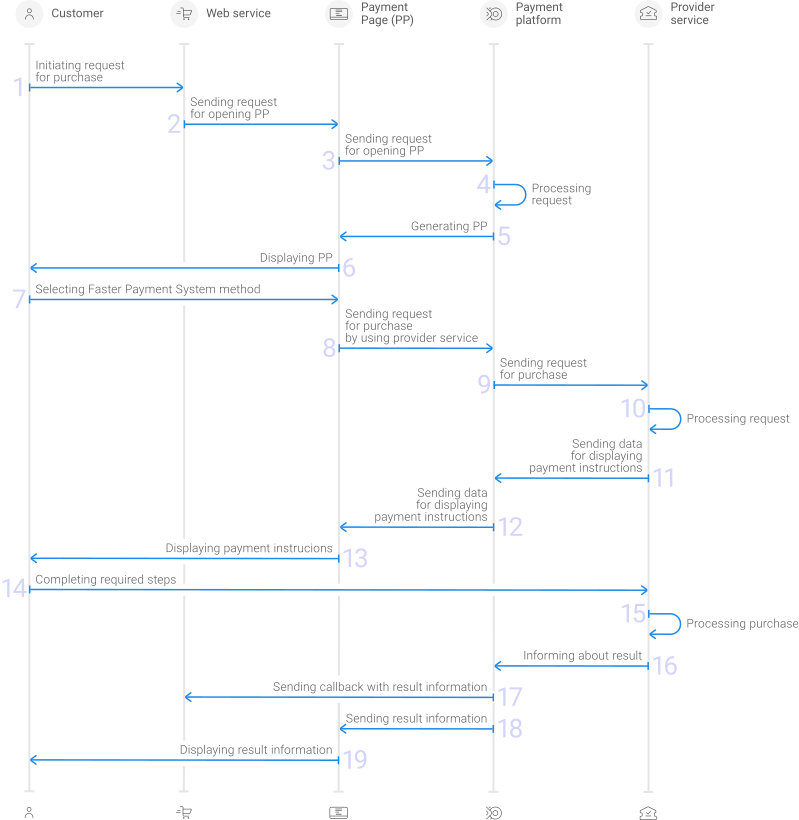
- A customer initiates a purchase in the web service.
- The web service sends the request for opening Payment Page to the specified EtoPlatezhi URL.
- The request for opening Payment Page is sent to the payment platform.
- The payment platform receives the request and validates the required parameters and signature.
- Payment Page is generated based on the project and request parameters.
- Payment Page is displayed to the customer.
- The customer selects the Faster Payments System method.
- The request for processing the payment by using the Faster Payments System method is received by the payment platform.
- The payment platform processes the request and sends it to the provider service.
- The request is processed on the side of the provider service.
- The data for displaying the payment instructions to the customer is sent from the provider service to the payment platform.
- The data for displaying the payment instructions is sent from the payment platform to Payment Page.
- The payment instructions are displayed to the customer.
- The customer completes all required payment steps.
- The purchase is processed in the provider service.
- The provider service sends a notification about the result to the payment platform.
- The payment platform sends the payment result callback to the web service.
- The payment platform sends the result information to Payment Page.
- The result information is displayed to the customer on Payment Page.
Information about the formats of requests and callbacks used for processing payments by using the Faster Payments System method via Payment Page is presented further in this section; general information about working with the Payment Page API is presented in Interaction concepts.
Request format
There are several things you need to consider when sending purchase requests by using the Faster Payments System method:
- The following parameters required for any payment must be specified:
project_id—project identifier obtained from EtoPlatezhi during integrationpayment_id—payment identifier unique within the projectpayment_currency—payment currency code in the ISO-4217 alpha-3 formatpayment_amount—payment amount in the smallest currency unitcustomer_id—customer identifier unique within the project
- The following parameters required for any payment must be specified:
project_id,payment_id,payment_currency,payment_amount,customer_id. - The currency of the payment can only be RUB.
- If you need to have the payment form displayed with the Faster Payments System method selected, set the
force_payment_methodparameter toforce_payment_method. - Additionally, any other parameters available for working with Payment Page can be used (details).
- After all target parameters are specified, generate a signature (details).
Thus, a correct request for opening the payment form using the Faster Payments System method must contain the project identifier, basic payment information (identifier, amount, and currency code), customer identifier and signature, as well as possible additional parameters.
{
   "project_id": 120,
   "payment_id": "580",
   "payment_amount": 1000,
   "payment_currency": "RUB",
   "customer_id": "customer1",
   "signature": "kUi2x9dKHAVNU0FYldOcZzUCwX6R\/ekpZhkIQg=="
}
{
   "project_id": 120,
   "payment_id": "580",
   "payment_amount": 1000,
   "payment_currency": "RUB",
   "customer_id": "customer1",
   "signature": "kUi2x9dKHAVNU0FYldOcZzUCwX6R\/ekpZhkIQg=="
}
Callback format
The Faster Payments System method uses the standard format for callbacks to deliver purchase results. For more information, see Handling callbacks (details).
The following is the example of a callback with information about a 100.00 RUB purchase made in the 1037 project.
{
    "project_id": 1037,
    "payment": {
        "id": "123456789",
        "type": "purchase",
        "status": "success",
        "date": "2024-06-15T13:04:15+0000",
        "method": "sbp-qr",
        "sum": {
            "amount": 10000,
            "currency": "RUB"
        },
        "description": "Test sale"
    },
    "customer": {
        "id": "123"
    },
    "operation": {
        "id": 62,
        "type": "sale",
        "status": "success",
        "date": "2024-06-15T13:05:15+0000",
        "created_date": "2024-06-15T13:04:15+0000",
        "request_id": "363dedea310b7e3e35-00000001",
        "sum_initial": {
            "amount": 10000,
            "currency": "RUB"
        },
        "sum_converted": {
            "amount": 10000,
            "currency": "RUB"
        },
        "code": "0",
        "message": "Success",
        "provider": {
            "id": 1782,
            "payment_id": "33007291SS518890B",
            "date": "2021-12-15T13:05:12+0000"
        }
    },
    "signature": "AAB6/UB0MJY+O/h11NfFIsO6WXRzCSnJDPXYg=="
}
The following is the example of a callback with information about a declined purchase.
{
    "project_id": 1037,
    "payment": {
        "id": "23456789",
        "type": "purchase",
        "status": "decline",
        "date": "2024-06-15T13:21:51+0000",
        "method": "sbp-qr",
        "sum": {
            "amount": 10000,
            "currency": "RUB"
        },
        "description": "Test sale"
    },
    "customer": {
        "id": "123"
    },
    "operation": {
        "id": 67,
        "type": "sale",
        "status": "decline",
        "date": "2024-06-15T13:22:51+0000",
        "created_date": "2024-06-15T13:21:51+0000",
        "request_id": "982fc18ec86c925d88-00000002",
        "sum_initial": {
            "amount": 10000,
            "currency": "RUB"
        },
        "sum_converted": {
            "amount": 10000,
            "currency": "RUB"
        },
        "code": "20000",
        "message": "General decline",
        "provider": {
            "id": 1782,
            "payment_id": "",
            "date": ""
        }
    },
    "signature": "zZBZHvDTIKG1+SdwLGW642i03JQL238wkmhcLcg=="
}
Useful links
The following articles can be useful when implementing purchases via Payment Page:
- Interaction concepts—about the interaction with the payment platform by using Payment Page.
- Signature generation and verification—about the procedure of generating and verifying signatures in requests and callbacks.
- Payment processing—about the types, processing models, and possible statuses of supported payments and operations.
- Purchase processing—about processing of one-time one-step purchases with immediate debiting of funds by using Payment Page.
- Handling operation processing information—about error and response codes that are used in the payment platform to record information about performing of operations.
COF purchases by using Payment Page
General information
COF purchases using Faster Payments System is a way of making COF purchases with debit requests or making recurring transactions using stored credentials. For more information about COF purchases, see On-demand COF purchase. Registration of a COF purchases is available by using Payment Page. For registration the web service must send a request containing the required parameters and signature, as well as data for registering a COF purchase in the recurring object, to the EtoPlatezhi URL and accept a callback with the result. In the callback about registering a COF purchase, you will get its ID, which you need to use to make or cancel regular payments via Gate. For more information, see the section COF purchases by using Gate.
Information about the formats of requests and callbacks used for processing payments by using the Faster Payments System method via Payment Page is presented further in this section; general information about working with the Payment Page API is presented in Interaction concepts.
Request format
There are several things you need to consider when sending purchase requests for registering COF purchases by using the Faster Payments System method:
- The following parameters required for any payment must be specified:
project_id—project identifier obtained from EtoPlatezhi during integrationpayment_id—payment identifier unique within the projectpayment_currency—payment currency code in the ISO-4217 alpha-3 formatpayment_amount—payment amount in the smallest currency unitcustomer_id—customer identifier unique within the project
- The following parameters required for any payment must be specified:
project_id,payment_id,payment_currency,payment_amount,customer_id. - To register a COF purchase, you must specify a
recurringobject containing the registration attribute and an explanation of the nature of the services provided in thepayment_descriptionparameter.When using the EtoPlatezhi JavaScript library, the
recurringobject in such a request can constitute a JSON object that includes the registerregisterwith the valuetrue. In other cases, therecurringobject, as well as the request body as a whole, must be specified as a URL string obtained from the original JSON object using URL-encoding conversion. - If you need to have the payment form displayed with the Faster Payments System method selected, set the
force_payment_methodparameter toforce_payment_method. - Additionally, any other parameters available for working with Payment Page can be used (details).
- After all target parameters are specified, generate a signature (details).
Thus, a correct request for opening the payment form using the Faster Payments System method must contain the project identifier, basic payment information (payment identifier, amount, and currency code), customer identifier, registration parameter and signature, as well as possible additional parameters.
{
   "project_id": 120,
   "payment_id": "580",
   "payment_amount": 100000,
   "payment_currency": "RUB",
   "customer_id": "customer1",
   "recurring": {"register":true},
   "payment_description": "example reason",
   "signature": "kUi2x9dKHAVNU0FYldOcZzUCwX6R\/ekpZhkIQg=="
}
{
   "project_id": 120,
   "payment_id": "580",
   "payment_amount": 100000,
   "payment_currency": "RUB",
   "customer_id": "customer1",
   "recurring": {"register":true},
   "payment_description": "example reason",
   "signature": "kUi2x9dKHAVNU0FYldOcZzUCwX6R\/ekpZhkIQg=="
}
At the same time, in case of selecting a bank among specific banks (4), the request for opening Payment Page may contain additional data.
{
   "project_id": 120,
   "payment_id": "580",
   "payment_amount": 1000,
   "payment_currency": "USD",
   "customer_id": "customer1",
   "force_payment_method": "test-pm",
   "payment_methods_options": {"test-code": {"split_banks": true, "banks_id": [..., ..., ...]}}
   "signature": "kUi2x9dKHAVNU0FYldOcZzUCwX6R\/ekpZhkIQg=="
}
Useful links
The following articles can be useful when implementing purchases via Payment Page:
- Interaction concepts—about the interaction with the payment platform by using Payment Page.
- Signature generation and verification—about the procedure of generating and verifying signatures in requests and callbacks.
- Payment processing—about the types, processing models, and possible statuses of supported payments and operations.
- Handling operation processing information—about error and response codes that are used in the payment platform to record information about performing of operations.
One-time purchases by using Gate
General information
To process a purchase through Gate by using the Faster Payments System method, the merchant's web service is required to do the following:
- Send a request with all the required parameters and signature to the EtoPlatezhi URL.
- Receive an intermediate callback from the payment platform and display the payment instructions to the customer.
- Receive the final callback from the payment platform.
The full sequence and special aspects of purchase processing are provided below.
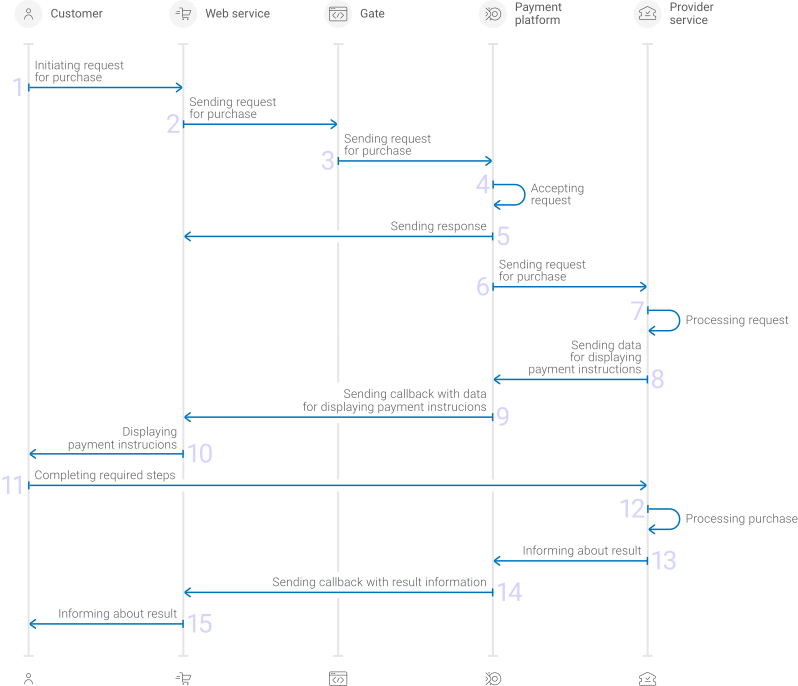
- A customer initiates a purchase by using the Faster Payments System method in the web service.
- The web service sends the request for processing the purchase by using Gate to the specified EtoPlatezhi URL.
- The payment platform receives the request.
- The payment platform validates the required parameters and signature in the request.
- The payment platform sends the response to the web service with information about the receipt of the request and its validity (details).
- The payment platform performs further processing of the request (with parameter consistency check) and sends it to the provider service.
- The request is processed on the side of the provider service.
- The data for displaying the payment instructions to the customer is sent from the provider service to the payment platform.
- The data for displaying the payment instructions is sent from the payment platform to the web service.
- The payment instructions are displayed to the customer.
- The customer completes all required payment steps.
- The purchase is processed in the provider service.
- The provider service sends the payment result notification to the payment platform.
- The payment platform sends the payment result callback to the web service.
- The customer receives the payment result information from the web service.
Information about the formats of requests and callbacks used for processing payments by using the Faster Payments System method via Gate is presented further in this section. General information about working with the Gate API is presented in Interaction concepts.
Request format
There are several things you need to consider when sending purchase requests by using the Faster Payments System method:
- To initiate each purchase, send a separate POST request to the /v2/payment/sbp-qr/sale endpoint.
- Each request must include the following objects and parameters:
- Object
general—general purchase information:project_id—project identifier obtained from EtoPlatezhi during integrationpayment_id—payment identifier unique within the projectsignature—request signature generated after all required parameters are specified (details—in the Signature generation and verification) (details)
- Object
payment—payment information:amount—payment amount in the smallest currency unitcurrency—payment currency code in the ISO-4217 alpha-3 format
- Object
customer—customer information:id—customer identifier unique within the projectip_address—customer IP address relevant for the initiated payment
- Object
- The currency of the payment can only be RUB.
- Additionally, any other parameters included in the specification can be used.
Thus, a correct purchase request by using the Faster Payments System method must contain the project identifier, basic payment information (identifier, amount, and currency code), customer identifier and IP address, signature, as well as possible additional parameters.
{
  "general": {
    "project_id": 210,
    "payment_id": "test_payment",
    "signature": "PJkV8ej\/UG0Di8hTng6JvipTv+AWoXW\/9MTO8yJA=="
  },
  "payment": {
    "amount": 1000,
    "currency": "RUB"
  },
  "customer": {
    "id": "customer123",
    "ip_address": "192.0.2.0"
  }
}
{
  "general": {
    "project_id": 210,
    "payment_id": "test_payment",
    "signature": "PJkV8ej\/UG0Di8hTng6JvipTv+AWoXW\/9MTO8yJA=="
  },
  "payment": {
    "amount": 1000,
    "currency": "RUB"
  },
  "customer": {
    "id": "customer123",
    "ip_address": "192.0.2.0"
  }
}
Formats of intermediate callbacks for displaying payment instructions
Each payment made with the Faster Payments System method requires displaying payment instructions to customers. To display payment instructions it is necessary to receive an intermediate callback from the payment platform and use the information included in the display_data array. The format of such callbacks is standard (details), and the following objects and parameters are included in the display_data array:
type—object typetitle—object namedata—data corresponding to the specified object type
The value of the data parameter depends on the value of the type parameter which can have one of the following values:
qr_img—QR code is passed as an image. In this case thedataparameter contains a string encoded using the Base64 scheme.qr_code_url—the payment link as an URL is specified in thedataparameter.qr_code_expired_timestamp—the QR code expiration date is specified in thedataparameter as a UNIX time threshold (in seconds, in accordance with ISO/IEC/IEEE 9945:2009), upon reaching which the QR code ceases to be valid.qr_lifetime—the QR code's validity period is specified in thedataparameter (in seconds, starting from the moment the callback containing thedisplay_dataarray was created on the payment platform's side).
The following is a callback fragment, containing a string for creating a QR code, its validity period, and a payment link as additional information.
    "display_data": [
        {
            "type": "qr_img",
            "title": "qr_code_img",
            "data": "image/png;base64 data"
        },
        {
            "type": "qr_url",
            "title": "qr_code_url",
            "data": "https://qr.nspk.ru/AS100001D9A3G?type=01&bank=1&crc=0C8A"
        },
        {
            "type": "add_info",
            "title": "qr_code_expired_timestamp",
            "data": "1718092645"
        },
        {
            "type": "add_info",
            "title": "qr_lifetime",
            "data": "1800"
        }
    ],
In addition to the payment link from the display_data array, it is recommended to provide the customer with the list of supported banks and instructions for mobile applications on the website of the Faster Payments System, as well as to warn the customer about the need to allow applications to be opened via links in the browser settings (due to the fact that the bank's application is opened via a URL).
Final callback format
The Faster Payments System method uses the standard format for callbacks to deliver purchase results. For more information, see Handling callbacks (details).
The following is the example of a callback with information about a 100.00 RUB purchase made in the 1037 project.
{
    "project_id": 1037,
    "payment": {
        "id": "123456789",
        "type": "purchase",
        "status": "success",
        "date": "2024-06-15T13:04:15+0000",
        "method": "sbp-qr",
        "sum": {
            "amount": 10000,
            "currency": "RUB"
        },
        "description": "Test sale"
    },
    "customer": {
        "id": "123"
    },
    "operation": {
        "id": 62,
        "type": "sale",
        "status": "success",
        "date": "2024-06-15T13:05:15+0000",
        "created_date": "2024-06-15T13:04:15+0000",
        "request_id": "363dedea310b7e3e35-00000001",
        "sum_initial": {
            "amount": 10000,
            "currency": "RUB"
        },
        "sum_converted": {
            "amount": 10000,
            "currency": "RUB"
        },
        "code": "0",
        "message": "Success",
        "provider": {
            "id": 1782,
            "payment_id": "33007291SS518890B",
            "date": "2021-12-15T13:05:12+0000"
        }
    },
    "signature": "AAB6/UB0MJY+O/h11NfFIsO6WXRzCSnJDPXYg=="
}
The following is the example of a callback with information about a declined purchase.
{
    "project_id": 1037,
    "payment": {
        "id": "23456789",
        "type": "purchase",
        "status": "decline",
        "date": "2024-06-15T13:21:51+0000",
        "method": "sbp-qr",
        "sum": {
            "amount": 10000,
            "currency": "RUB"
        },
        "description": "Test sale"
    },
    "customer": {
        "id": "123"
    },
    "operation": {
        "id": 67,
        "type": "sale",
        "status": "decline",
        "date": "2024-06-15T13:22:51+0000",
        "created_date": "2024-06-15T13:21:51+0000",
        "request_id": "982fc18ec86c925d88-00000002",
        "sum_initial": {
            "amount": 10000,
            "currency": "RUB"
        },
        "sum_converted": {
            "amount": 10000,
            "currency": "RUB"
        },
        "code": "20000",
        "message": "General decline",
        "provider": {
            "id": 1782,
            "payment_id": "",
            "date": ""
        }
    },
    "signature": "zZBZHvDTIKG1+SdwLGW642i03JQL238wkmhcLcg=="
}
Useful links
The following articles can be useful when implementing purchases via Gate:
- Interaction concepts—about the interaction with the payment platform by using Gate.
- Signature generation and verification—about the procedure of generating and verifying signatures in requests and callbacks.
- Payment processing—about the types, processing models, and possible statuses of supported payments and operations.
- One-time one-step purchase—about processing of one-time one-step purchases by using Gate.
- Handling operation processing information—about error and response codes that are used in the payment platform to record information about performing of operations.
COF purchases by using Gate
General information
COF purchases using Faster Payments System is a way of making COF purchases with debit requests or making recurring transactions using stored credentials. For more information about COF purchases, see On-demand COF purchase.
Information about the formats of requests and callbacks used for processing payments by using the Faster Payments System method via Gate is presented further in this section. General information about working with the Gate API is presented in Interaction concepts.
COF purchase registration
To register a COF purchase by using Gate, the merchant is required to send a request for purchase with all the required parameters (including the register parameter of the recurring object, set to the value true) to the EtoPlatezhi URL and get the callback with the payment result from the payment platform. To register a regular payment the request should also contain information about the frequency, amount, start and end dates of regular payments. Note that if you specify any other value in the register parameter, a one-time payment will be made, and recurring payments will not be registered.
The COF purchase registration callback contains the identifier of the COF purchase, which can be used to make regular payments.
For more information about purchase processing by using Gate, see One-time purchases by using Gate.
Format of requests for registration of COF purchases
There are several things you need to consider when sending requests for registering COF purchases by using the Faster Payments System method:
- To register each COF purchase, send a separate POST request to the /v2/payment/sbp-qr/sale endpoint.
- Each request must include the following objects and parameters:
- Object
general—general purchase information:project_id—project identifier obtained from EtoPlatezhi during integrationpayment_id—payment identifier unique within the projectsignature—request signature generated after all required parameters are specified (details—in the Signature generation and verification) (details)
- Object
payment—payment information:amount—payment amount in the smallest currency unitcurrency—payment currency code in the ISO-4217 alpha-3 formatdescription—explanation of the nature of the provided services
- Object
customer—customer information:id—customer identifier unique within the projectip_address—customer IP address relevant for the initiated payment
- Object
recurring—COF purchase information:register—payment registration as a COF purchase
- Object
- Additionally, any other parameters included in the specification can be used.
Thus, a correct COF purchase registration request by using the Faster Payments System method must contain the project identifier, basic payment information (payment identifier, amount, and currency code), customer identifier and IP address, the registration parameter and the conditions for regular payments, as well as signature.
 {
  "general": {
    "project_id": 208,
    "payment_id": "TEST_15427007172789",
    "signature": "DH0v2pZnkK9hwytOqrWdbltzO5GMSkzd0Iq6lM2...==",
  },
  "customer": {
    "ip_address": "192.0.2.0",
    "id": "123"
  },
  "payment": {
    "amount": 1000,
    "currency": "RUB",
    "description": "example reason"
  },
  "recurring": {
    "register": true
  }
}
 {
  "general": {
    "project_id": 208,
    "payment_id": "TEST_15427007172789",
    "signature": "DH0v2pZnkK9hwytOqrWdbltzO5GMSkzd0Iq6lM2...==",
  },
  "customer": {
    "ip_address": "192.0.2.0",
    "id": "123"
  },
  "payment": {
    "amount": 1000,
    "currency": "RUB",
    "description": "example reason"
  },
  "recurring": {
    "register": true
  }
}
Format of requests for COF purchase processing
Once a COF payment has been registered, to initiate the recurring payment, you must send a request to the payment platform with the COF purchase ID, which you previously received in the callback after registering the COF purchase. You initiate COF purchase by sending a recurring request to the payment platform.
There are several things you must consider when processing COF purchases performing by using the Faster Payments System method:
- To process each purchase, send a separate POST request to the /v2/payment/sbp-qr/recurring endpoint.
- Each request must include the following objects and parameters:
- Object
general—general purchase information:project_id—project identifier obtained from EtoPlatezhi during integrationpayment_id—payment identifier unique within the projectsignature—request signature generated after all required parameters are specified (details—in the Signature generation and verification) (details)
- Object
payment—payment information:amount—payment amount in the smallest currency unitcurrency—payment currency code in the ISO-4217 alpha-3 format
- Object
customer—customer information:ip_address—customer IP address relevant for the initiated payment
- Object
recurring—COF purchase information:id—registered COF purchase identifier
- Object
- Additionally, any other parameters included in the specification can be used.
Thus, a correct purchase request by using the Faster Payments System method must contain the project identifier, basic payment information (payment identifier, amount, and currency code), customer IP address, COF purchase identifier, as well as signature.
 {
  "general": {
    "project_id": 208,
    "payment_id": "TEST_15427007172789",
    "signature": "DH0v2pZnkK9hwytQ6bltzO5GMSkzd0Iq6lM2...==",
  },
  "customer": {
    "ip_address": "192.0.2.0"
  },
  "payment": {
    "amount": 1000,
    "currency": "RUB"
  },
  "recurring": {
    "id": 1234567890
  }
}
 {
  "general": {
    "project_id": 208,
    "payment_id": "TEST_15427007172789",
    "signature": "DH0v2pZnkK9hwytQ6bltzO5GMSkzd0Iq6lM2...==",
  },
  "customer": {
    "ip_address": "192.0.2.0"
  },
  "payment": {
    "amount": 1000,
    "currency": "RUB"
  },
  "recurring": {
    "id": 1234567890
  }
}
Formats of intermediate callbacks for displaying payment instructions
Each payment made with the Faster Payments System method requires displaying payment instructions to customers. To display payment instructions it is necessary to receive an intermediate callback from the payment platform and use the information included in the display_data array. The format of such callbacks is standard (details), and the following objects and parameters are included in the display_data array:
type—object typetitle—object namedata—data corresponding to the specified object type
The value of the data parameter depends on the value of the type parameter which can have one of the following values:
qr_img—QR code is passed as an image. In this case thedataparameter contains a string encoded using the Base64 scheme.qr_code_url—the payment link as an URL is specified in thedataparameter.qr_code_expired_timestamp—the QR code expiration date is specified in thedataparameter as a UNIX time threshold (in seconds, in accordance with ISO/IEC/IEEE 9945:2009), upon reaching which the QR code ceases to be valid.qr_lifetime—the QR code's validity period is specified in thedataparameter (in seconds, starting from the moment the callback containing thedisplay_dataarray was created on the payment platform's side).
The following is a callback fragment, containing a string for creating a QR code, its validity period, and a payment link as additional information.
    "display_data": [
        {
            "type": "qr_img",
            "title": "qr_code_img",
            "data": "image/png;base64 data"
        },
        {
            "type": "qr_url",
            "title": "qr_code_url",
            "data": "https://qr.nspk.ru/AS100001D9A3G?type=01&bank=1&crc=0C8A"
        },
        {
            "type": "add_info",
            "title": "qr_code_expired_timestamp",
            "data": "1718092645"
        },
        {
            "type": "add_info",
            "title": "qr_lifetime",
            "data": "1800"
        }
    ],
In addition to the payment link from the display_data array, it is recommended to provide the customer with the list of supported banks and instructions for mobile applications on the website of the Faster Payments System, as well as to warn the customer about the need to allow applications to be opened via links in the browser settings (due to the fact that the bank's application is opened via a URL).
Useful links
The following articles can be useful when implementing purchases via Gate:
- Interaction concepts—about the interaction with the payment platform by using Gate.
- Signature generation and verification—about the procedure of generating and verifying signatures in requests and callbacks.
- Payment processing—about the types, processing models, and possible statuses of supported payments and operations.
- One-step purchase—about processing of one-time one-step purchases with immediate debiting of funds by using Gate.
- Handling operation processing information—about error and response codes that are used in the payment platform to record information about performing of operations.
Refunds by using Gate
General information
To perform a refund through Gate by using the Faster Payments System method, send a request with all required parameters and signature to the EtoPlatezhi URL and receive a callback with the result. The full sequence and special aspects of refund performing are provided below.
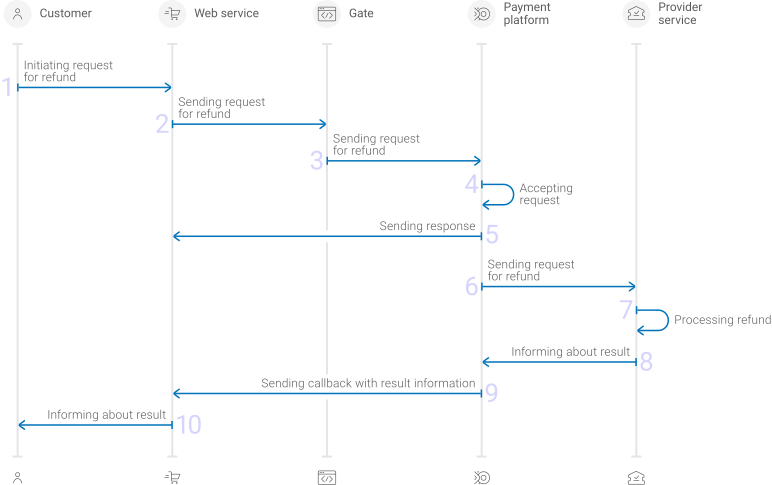
- A customer initiates a refund.
- The web service sends the request for performing the refund by using Gate to the specified EtoPlatezhi URL.
- The payment platform receives the request.
- The payment platform validates the required parameters and signature in the request.
- The payment platform sends the response to the web service with information about the receipt of the request and its validity (details).
- The payment platform performs further processing of the request (with parameter consistency check) and sends it to the provider service.
- The refund is processed on the side of the provider service.
- The provider service sends the result notification to the payment platform.
- The payment platform sends the result callback to the web service.
- The customer receives the refund result information from the web service.
Information about the formats of requests and callbacks used for performing refunds by using the Faster Payments System method via Gate is presented further in this section. General information about working with the Gate API is presented in Interaction concepts.
Request format
There are several things you need to consider when sending refund requests by using the Faster Payments System method:
- To initiate each refund, send a separate POST request to the /v2/payment/sbp-qr/refund endpoint.
- Each request must include the following objects and parameters:
- Object
general—general refund information:project_id—project identifier obtained from EtoPlatezhi during integrationpayment_id—identifier of the payment that needs to be refundedpayment identifiersignature—request signature generated after all required parameters are specified (details—in the Signature generation and verification)
- Object
payment—refund information:description—refund description or comment
- Object
customer—customer information:ip_address—customer IP address relevant for the initiated refund
- Object
- Additionally, any other parameters included in the specification can be used.
Thus, a correct refund request by using the Faster Payments System method must contain the project and payment identifiers, description of the refund, the customer IP address and signature.
{
  "general": {
    "project_id": 210,
    "payment_id": "test_payment",
    "signature": "PJkV8ej\/UG0Di8hTng6JvipTv+AWoXW\/9MTO8yJA=="
  },
  "payment": {
    "description": "test refund"
  },
  "customer": {
    "ip_address": "192.0.2.0"
  }
}
{
  "general": {
    "project_id": 210,
    "payment_id": "test_payment",
    "signature": "PJkV8ej\/UG0Di8hTng6JvipTv+AWoXW\/9MTO8yJA=="
  },
  "payment": {
    "description": "test refund"
  },
  "customer": {
    "ip_address": "192.0.2.0"
  }
}
Callback format
The Faster Payments System method uses the standard format for callbacks to deliver refund results. For more information, see Handling callbacks.
The following is the example of a callback with information about a 100.00 RUB refund made in the 1037 project.
{
    "project_id": 1037,
    "payment": {
        "id": "62153051",
        "type": "purchase",
        "status": "refunded",
        "date": "2024-06-15T13:21:51+0000",
        "method": "sbp-qr",
        "sum": {
            "amount": 10000,
            "currency": "RUB"
        },
        "description": "Test sale"
    },
    "customer": {
        "id": "1234"
    },
    "operation": {
        "id": 63,
        "type": "refund",
        "status": "success",
        "date": "2024-06-15T14:23:56+0000",
        "created_date": "2024-06-15T14:22:51+0000",
        "request_id": "ea2e5888a65cf1b1f2b5-00000003",
        "sum_initial": {
            "amount": 10000,
            "currency": "RUB"
        },
        "sum_converted": {
            "amount": 10000,
            "currency": "RUB"
        },
        "code": "0",
        "message": "Success",
        "provider": {
            "id": 1782,
            "payment_id": "7C035795EJ562523A",
            "date": "2024-06-15T14:23:51+0000"
        }
    },
    "signature": "uU6LOpEjEqxeqJ2GsDkDnaY+1p1m4aS5zTPkJA=="
}
The following is the example of a callback with information about a declined refund.
{
    "project_id": 1037,
    "payment": {
        "id": "59375393",
        "type": "purchase",
        "status": "success",
        "date": "2024-06-15T14:23:56+0000",
        "method": "sbp-qr",
        "sum": {
            "amount": 10000,
            "currency": "RUB"
        },
        "description": "Test sale"
    },
    "customer": {
        "id": "1234"
    },
    "operation": {
        "id": 84,
        "type": "refund",
        "status": "decline",
        "date": "2024-06-15T14:23:56+0000",
        "created_date": "2024-06-15T14:23:56+0000",
        "request_id": "776d5d3e602912e88858c922e34e5-00000001",
        "sum_initial": {
            "amount": 10000,
            "currency": "RUB"
        },
        "sum_converted": {
            "amount": 10000,
            "currency": "RUB"
        },
        "code": "20000",
        "message": "General decline",
        "provider": {
            "id": 1782,
            "payment_id": "",
            "date": ""
        }
    },
    "signature": "qjVnKRZX51lrxh5kqCzurbJbQQSAeFwqH7H9gk7gUYI3A=="
}
Useful links
The following articles can be useful when implementing refunds via Gate:
- Interaction concepts—about the interaction with the payment platform by using Gate.
- Signature generation and verification—about the procedure of generating and verifying signatures in requests and callbacks.
- Payment processing—about the types, processing models, and possible statuses of supported payments and operations.
- Purchase refunds—about performing of refunds by using Gate.
- Handling operation processing information—about error and response codes that are used in the payment platform to record information about performing of operations.
Refunds by using Dashboard
When working with Dashboard, you can perform single and mass refunds by using the Faster Payments System method.
- To perform a single refund, select the target purchase, open its information tab, specify the amount of the refund, send a request and verify that the refund has been performed.
-
To perform a mass refund, prepare and upload a file with information about all target refunds, send a batch request, and verify that the refunds have been performed.
Use a CSV file structured according to the requirements presented in the Mass payments data section. The refund parameters must comply with the requirements (you do not have to generate a signature because it is specified by Dashboard).
More information Information about performing refunds by using Dashboard is presented in a separate section.
Payouts by using Gate
General information
To process a payout through Gate by using the Faster Payments System method, the merchant's web service is required to do the following:
- Send a request with all the required parameters and signature to the EtoPlatezhi URL.
- If the payout needs to be confirmed, accept the appropriate callback and send a request to continue the payout (details about additional payment information submission are available in Submission of additional payment information).
- Receive the final callback from the payment platform.
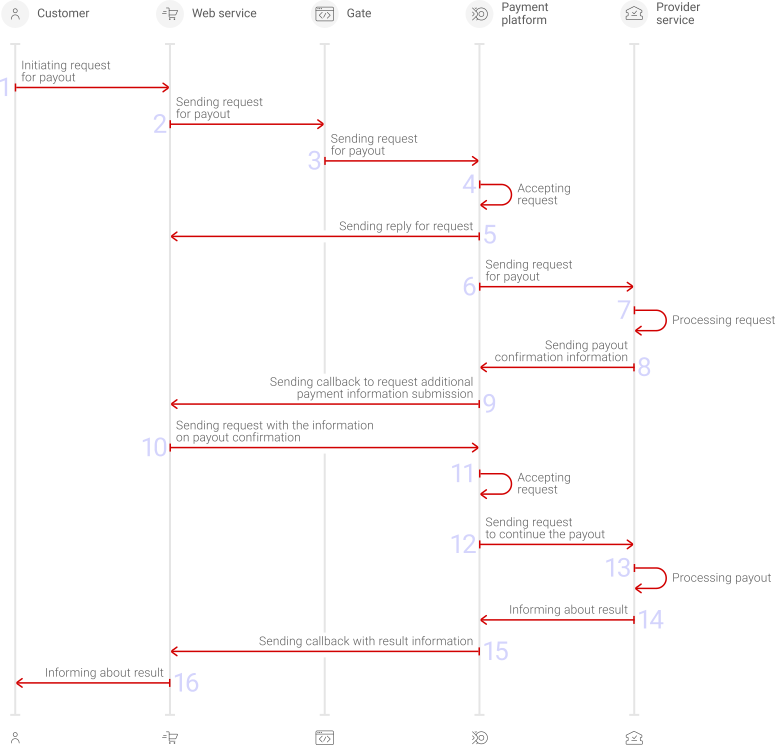
The full sequence and special aspects of payout processing are provided below.
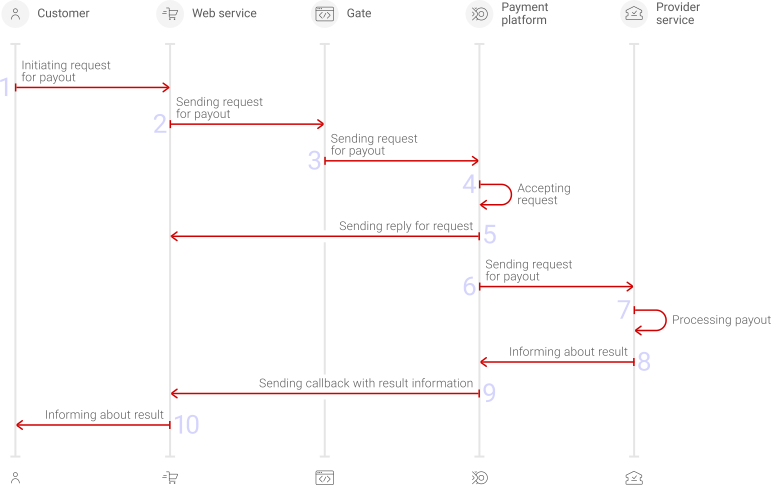
- A customer initiates a payout by using the Faster Payments System method in the web service.
- The web service sends the request for processing the payout by using Gate to the specified EtoPlatezhi URL.
- The payment platform receives the request.
- The payment platform validates the required parameters and signature in the request.
- The payment platform sends the response to the web service with information about the receipt of the request and its validity (details).
- The payment platform performs further processing of the request (with parameter consistency check) and sends it to the provider service.
- The payout is processed on the side of the provider service.
- The provider service sends the result notification to the payment platform.
- The payment platform sends the result callback to the web service.
- The customer receives the payout result information from the web service.
- A customer initiates a payout by using the Faster Payments System method in the web service.
- The web service sends the request for processing the payout by using Gate to the specified EtoPlatezhi URL.
- The payment platform receives the request.
- The payment platform validates the required parameters and signature in the request.
- The payment platform sends the response to the web service with information about the receipt of the request and its validity (details).
- The payment platform performs further processing of the request (with parameter consistency check) and sends it to the provider service.
- The payout is processed on the side of the provider service.
- The provider service sends the information about payout confirmation to the payment platform.
- The payment platform sends the callback to request additional payment information to the web service.
- The web service sends the request containing the confirmation information to the payment platform.
- The payment platform performs additional request processing.
- The payment platform sends the request to continue the payout to the provider service.
- The payout is processed on the side of the provider service.
- The provider service sends the result notification to the payment platform.
- The payment platform sends the result callback to the web service.
- The customer receives the payout result information from the web service.
Information about the formats of requests and callbacks used for processing payouts by using the Faster Payments System method via Gate is presented further in this section. General information about working with the Gate API is presented in Interaction concepts.
Request format
There are several things you need to consider when sending payout requests by using the Faster Payments System method:
- To initiate each payout send a POST request to the /v2/payment/sbp-qr/payout endpoint.
- Each request must include the following objects and parameters:
- Object
general—general payout information:project_id—project identifier obtained from EtoPlatezhi during integrationpayment_id—payment identifier unique within the projectsignature—request signature created after all required parameters are specified (details—in the Signature generation and verification)
- Object
payment—payment information:amount—payout amount in the smallest currency unitcurrency—payout currency code in the ISO-4217 alpha-3 format
- Object
customer—customer information:id—customer identifier unique within the projectip_address—IP address relevant for the initiated payout
- Object
account—account information:number—phone number, which must be used for the payout, must be specified using a country code and without punctuation or special characters, for example79031234567bank_id—bank identifier
- Object
- When using the payout option without additional confirmation, it may be necessary to specify customer information in the PAM (Personal Assurance Message) format using the
pamparameter of thecustomerobject. This information includes the first name, patronymic (if any) and the first letter of the last name without a dot (for example,Софья Васильевна К). The necessity of specifying this parameter should be clarified with your EtoPlatezhi account manager. - The currency of the payment can only be RUB.
- Additionally, any other parameters included in the specification can be used.
Thus, a correct payout request by using the Faster Payments System method must contain the project identifier, basic payment information (identifier, amount, and currency code), customer identifier, IP address and phone number, signature, as well as customer information in the PAM format.
{
  "general": {
    "project_id": 210,
    "payment_id": "test_payment",
    "signature": "PJkV8ej\/UG0Di8hTng6JvipTv+AWoXW\/9MTO8yJA=="
  },
  "payment": {
    "amount": 1000,
    "currency": "RUB"
  },
  "customer": {
    "id": "customer123",
    "ip_address": "192.0.2.0",
    "pam": "Софья Васильевна К"
  },
  "account": {
    "number": "79031234567",
    "bank_id": 12345
  }
}
{
  "general": {
    "project_id": 210,
    "payment_id": "test_payment",
    "signature": "PJkV8ej\/UG0Di8hTng6JvipTv+AWoXW\/9MTO8yJA=="
  },
  "payment": {
    "amount": 1000,
    "currency": "RUB"
  },
  "customer": {
    "id": "customer123",
    "ip_address": "192.0.2.0",
    "pam": "Софья Васильевна К"
  },
  "account": {
    "number": "79031234567",
    "bank_id": 12345
  }
}
Format of requests and callbacks for additional payment information submission
When using the option of payout processing with additional confirmation on the merchant side, it is necessary to ensure the receipt of callbacks for additional payment information submission and the sending of requests confirming these payouts.
Payout confirmation information is expected within five seconds on the provider side. After this time, if confirmation has not been received, the payout is declined. In this regard, taking into account the time required for the delivery of messages, it is recommended to send response requests with confirmation of payouts within three seconds from the moment the corresponding callbacks are received.
The callback for additional payment information submission contains the following:
clarification_fieldsarray with theconfirmparameter. In this case the parameter indicates that the payout needs to be confirmed.provider_extra_fieldswith theaccount_nameparameter. In this case the parameter contains the first name and the first letter of the last name of the person who has an account in the specified bank associated with the specified mobile phone number (based on the bank's data).
The following example of the callback fragment contains the information which is required to continue the payment.
    "clarification_fields": [
        "confirm"
    ],
...
    "provider_extra_fields": {
        "account_name": "Svetlana L"
    }
The web service needs to submit the requested additional payment information in a request to the /v2/payment/clarification endpoint by using the POST HTTP method. The request must contain the following objects and parameters:
general—object that contains general request identification information:project_id—the project ID which is relevant to the paymentpayment_id—payment ID which is relevant to the data being sentsignature—signature generated after all of the required parameters are specified. For more information about signature generation, see Signature generation and verification.
additional_data—object that contains additional payment information that payment platform requests:confirm—parameter containing the payout confirmation information (booleandata type)
Thus, a correct request must include project and payment IDs, signature and additional payment information:
{
  "general": {
    "project_id": 11,
    "payment_id": "EPr-bf14",
    "signature": "v7KNMpfogAthg1ZZ5D/aZAeb0VMdeR+CqghwSm...=="
  },
  "additional_data": {
        "confirm": true
  }
}
As the request with the confirmation code is sent, payment processing may continue as follows:
- If the value
trueis specified in theconfirmparameter and the information reached the provider in time, the payout processing is continued on the payment platform and provider side, after which the final callback is sent to the web service. - If the value
falseor any other value is specified in theconfirmparameter or the information did not reach the provider in time, the payout is declined.
Format of final callbacks
The Faster Payments System method uses the standard format for callbacks to deliver payout results. For more information, see Handling callbacks.
The following is the example of a callback with information about a 1.00 RUB payout made in the 8181 project.
{
    "project_id": 8181,
    "payment": {
        "id": "sbp_test_1",
        "type": "payout",
        "status": "success",
        "date": "2022-10-27T12:36:28+0000",
        "method": "sbp-qr",
        "sum": {
            "amount": 100,
            "currency": "RUB"
        },
        "description": ""
    },
    "account": {
        "number": "***0091"
    },
    "customer": {
        "id": "test_1"
    },
    "operation": {
        "id": 12,
        "type": "payout",
        "status": "success",
        "date": "2022-10-27T12:36:28+0000",
        "created_date": "2022-10-27T12:35:54+0000",
        "request_id": "341d14d645d9123e388c0661147e40dfaf9d-00000001",
        "sum_initial": {
            "amount": 100,
            "currency": "RUB"
        },
        "sum_converted": {
            "amount": 100,
            "currency": "RUB"
        },
        "code": "0",
        "message": "Success",
        "provider": {
            "id": 18932,
            "payment_id": "824",
            "auth_code": "",
            "date": "2022-10-27T12:36:17+0000"
        }
    },
    "signature": "X5xSW/oeLKzL9303WzgxQh7Cmico59B3wl/V78kcg/JSSBQ=="
}
The following is the example of a callback with information about a declined payout.
{
    "project_id": 8181,
    "payment": {
        "id": "sbp_test_2",
        "type": "payout",
        "status": "decline",
        "date": "2022-10-27T12:41:59+0000",
        "method": "sbp-qr",
        "sum": {
            "amount": 100,
            "currency": "RUB"
        },
        "description": ""
    },
    "account": {
        "number": "***0091"
    },
    "customer": {
        "id": "test_1"
    },
    "operation": {
        "id": 13,
        "type": "payout",
        "status": "decline",
        "date": "2022-10-27T12:41:59+0000",
        "created_date": "2022-10-27T12:41:30+0000",
        "request_id": "2f0866179aba2ec5dd9781dd07e2888-00000001",
        "sum_initial": {
            "amount": 100,
            "currency": "RUB"
        },
        "sum_converted": {
            "amount": 100,
            "currency": "RUB"
        },
        "code": "20000",
        "message": "General decline",
        "provider": {
            "id": 18932,
            "payment_id": "",
            "auth_code": ""
        }
    },
    "signature": "nb8RCW9/815yZEK0UMfWse6R0VlUJwpoyUWGHKXY18bX8jE41Q=="
}
Useful links
The following articles can be useful when implementing payouts via Gate:
- Interaction concepts—about the interaction with the payment platform by using Gate.
- Signature generation and verification—about the procedure of generating and verifying signatures in requests and callbacks.
- Payment processing—about the types, processing models, and possible statuses of supported payments and operations.
- Payouts—about processing of payouts by using Gate.
- Handling operation processing information—about error and response codes that are used in the payment platform to record information about performing of operations.
Payouts by using Dashboard
When working with Dashboard, you can process single and mass payouts by using the Faster Payments System method.
- To process a single payout, open the payout form, specify all required parameters (including the payment method), send a request and verify that the payout has been processed.
-
To process a mass payout, prepare and upload a file with information about all target payouts, send a batch request, and verify that the payouts have been processed.
Use a CSV file structured according to the requirements presented in the Mass payments data section. The payout parameters must comply with the requirements (you do not have to generate a signature because it is specified by Dashboard).
More information about processing payouts by using Dashboard is presented in a separate section.
Analysis of payments results
To analyse information about payments made with the Faster Payments System method as well as other methods, you can use:
- Dashboard interface toolkit with various lists and analytic panels.
- Reports in CSV file format, available via the Reports section (one-time and periodically).
- Data in JSON format, sent by program requests to a specified URL by using the Data API interface (details).
If you have any questions, refer to the documentation (Dashboard and Using Data API) and EtoPlatezhi technical support.