SberPay
Overview
Introduction
SberPay is a payment method which allows you to process payments in Russian roubles by using bank accounts in Russia. This method supports purchases and refunds. In addition, the implementation of credential-on-file purchases is in development.
This article provides information about working with the SberPay method: general insights are presented in the Overview section, while information about the actions required to process payments and perform other actions is presented in the sections that follow.
General information
| Payment method type | Bank payments |
|---|---|
| Payment instruments | Bank accounts |
| Countries and regions | RU |
| Payment currencies | RUB |
| Currency conversion | – |
| One-time purchases | + |
| Credential-on-file purchases | + |
| Full refunds | + |
| Partial refunds | – |
| Payouts | – |
| Chargebacks | – |
| Notes | – |
| Onboarding and access fee | refer to your EtoPlatezhi account manager |
Interaction diagram
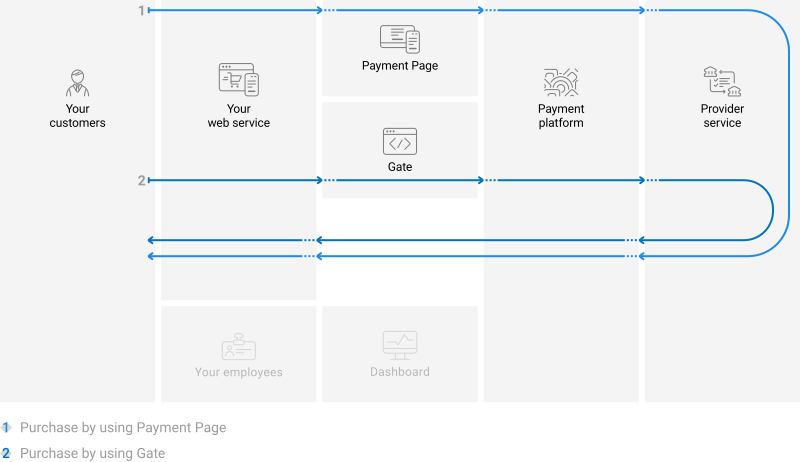
Payment processing by using the SberPay method involves the merchant's web service, one of EtoPlatezhi interfaces, the EtoPlatezhi payment platform, and technical facilities of the provider service.
Operations support
Various platform interfaces can be used to process payments and perform operations using the SberPay method. Purchases can be processed by using Payment Page, Gate and Dashboard (using payment links). At the same time, regardless of the interfaces used, amount limitations are applicable. Refer to your EtoPlatezhi account manager for more information.
Processing scenarios
To perform a purchase by using the SberPay method, you need to redirect the customer to the provider service.
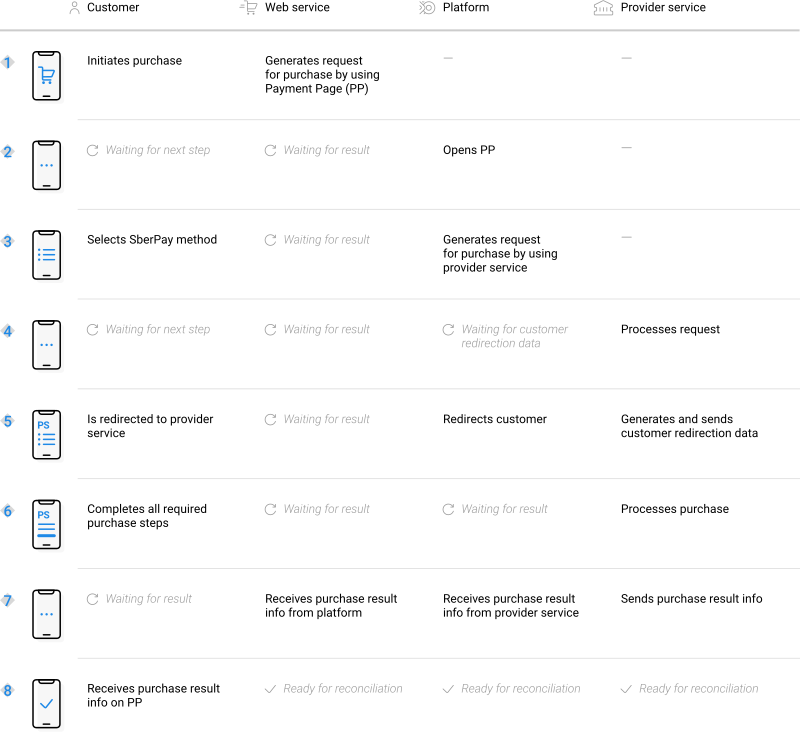
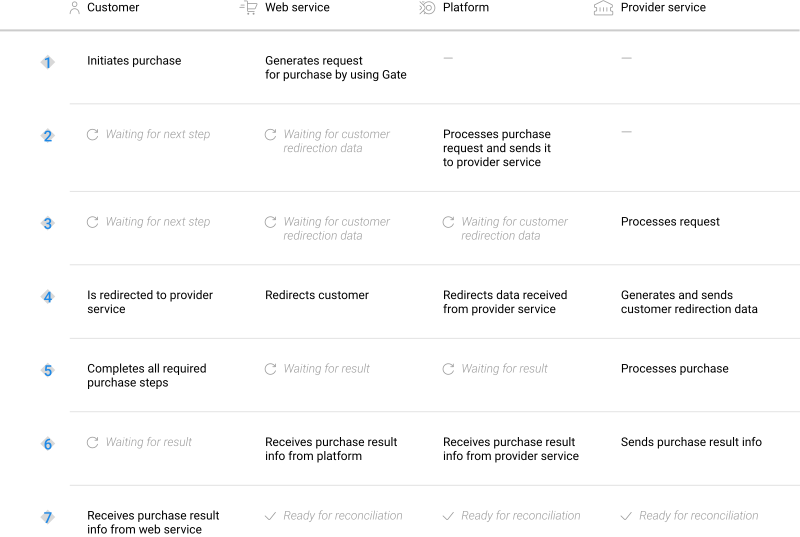
Scenarios for performing operations via the main interfaces of the payment platform correspond to those presented in the diagrams. Similarly, when additional features (such as payment links) are used, scenarios for performing operations also correspond to the specifics of those features.
Purchases by using Payment Page
General information
To process a purchase through Payment Page by using the SberPay method, the merchant's web service is required to send a request with all required parameters and signature to the EtoPlatezhi URL and receive a callback with the result. The full sequence and special aspects of purchase processing are provided below.
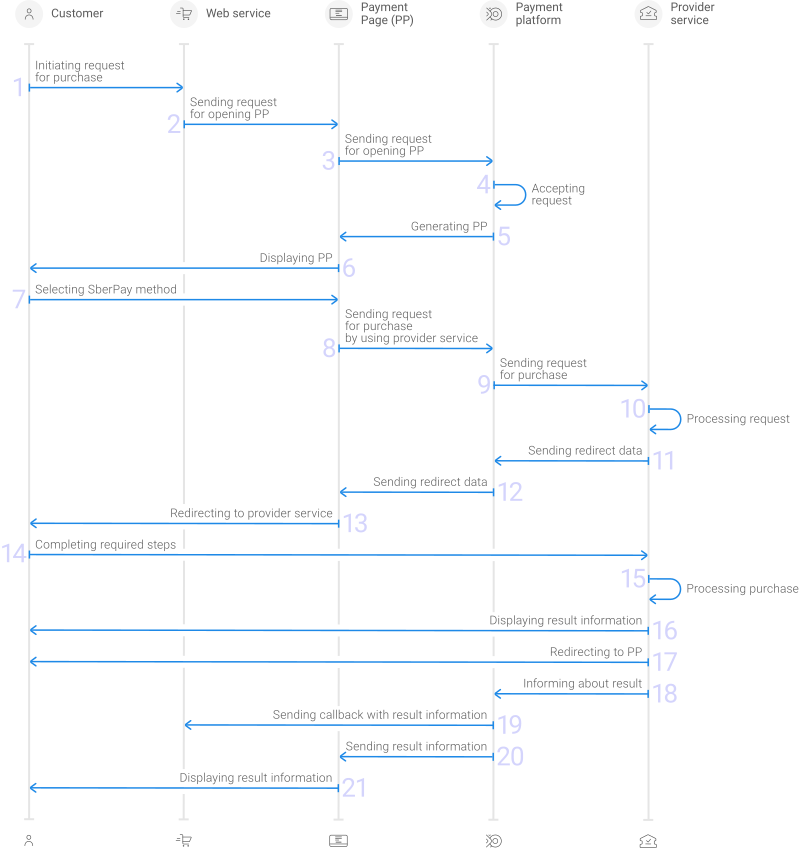
- A customer initiates a purchase in the web service.
- The web service sends the request for opening Payment Page to the specified EtoPlatezhi URL.
- The request for opening Payment Page is sent to the payment platform.
- The payment platform receives the request and validates the required parameters and signature.
- Payment Page is generated based on the project and request parameters.
- Payment Page is displayed to the customer.
- The customer selects the SberPay method.
- The payment platform receives the request for processing the payment by using the SberPay method.
- The payment platform processes the request and sends it to the provider service.
- The request is processed on the provider service side.
- The data for redirecting the customer to the provider service is sent from the provider service to the payment platform.
- The data for redirecting the customer is sent from the payment platform to Payment Page.
- The customer is redirected to the provider service.
- The customer completes all required payment steps.
- The purchase is processed in the provider service.
- The result information is displayed to the customer in the provider service.
- The customer is redirected to Payment Page.
- The provider service sends a notification about the result to the payment platform.
- The payment platform sends the payment result callback to the web service.
- The payment platform sends the result information to Payment Page.
- The result information is displayed to the customer on Payment Page.
Information about the formats of requests and callbacks used for processing payments by using the SberPay method via Payment Page is presented further in this section; general information about working with the Payment Page API is presented in Interaction concepts.
Request format
There are several things you need to consider when sending purchase requests by using the SberPay method:
- The following parameters required for any payment must be specified:
project_id—project identifier obtained from EtoPlatezhi during integrationpayment_id—payment identifier unique within the projectpayment_currency—payment currency code in the ISO-4217 alpha-3 formatpayment_amount—payment amount in the smallest currency unitcustomer_id—customer identifier unique within the project
- The following parameters required for any payment must be specified:
project_id,payment_id,payment_currency,payment_amount,customer_id. - Additionally, it is required to specify the phone number of the customer in the
customer_account_numberparameter. - The currency of the payment can only be RUB.
- If you need to have the payment form displayed with the SberPay method selected, set the
force_payment_methodparameter tosberpay. - Additionally, any other parameters available for working with Payment Page can be used (details).
- After all target parameters are specified, generate a signature (details).
Thus, a correct request for opening the payment form using the SberPay method must contain the project identifier, basic payment information (identifier, amount, and currency code), customer identifier, phone number and signature, as well as possible additional parameters.
{
   "project_id": 120,
   "payment_id": "580",
   "payment_amount": 1000,
   "payment_currency": "RUB",
   "customer_id": "customer1",
   "customer_account_number": "+71231234567",
   "signature": "kUi2x9dKHAVNU0FYldOcZzUCwX6R\/ekpZhkIQg=="
}
{
   "project_id": 120,
   "payment_id": "580",
   "payment_amount": 1000,
   "payment_currency": "RUB",
   "customer_id": "customer1",
   "customer_account_number": "+71231234567",
   "signature": "kUi2x9dKHAVNU0FYldOcZzUCwX6R\/ekpZhkIQg=="
}
Callback format
The SberPay method uses the standard format for callbacks to deliver purchase results. For more information, see Handling callbacks (details).
The following is the example of a callback with information about a 1,000.00 RUB purchase made in the 129103 project.
 {
        "customer": {
            "id": "f4d68g5f"
        },
        "project_id": 129103,
        "payment": {
            "id": "testtoo0003",
            "type": "purchase",
            "status": "success",
            "date": "2025-06-19T10:39:26+0000",
            "method": "sberpay",
            "sum": {
                "amount": 100000,
                "currency": "RUB"
            },
            "description": ""
        },
        "operation": {
            "sum_initial": {
                "amount": 100000,
                "currency": "RUB"
            },
            "sum_converted": {
                "amount": 100000,
                "currency": "RUB"
            },
            "code": "0",
            "message": "Success",
            "provider": {
                "id": 18301,
                "payment_id": "71b83839-4514220488",
                "auth_code": ""
            },
            "id": 5023372010140727,
            "type": "sale",
            "status": "success",
            "date": "2025-06-19T10:39:26+0000",
            "created_date": "2025-06-19T10:37:20+0000",
            "request_id": "9d8138a67b35b0402779e9f40beffd7f3-05023373"
        },
        "signature": "KmV6HLSQFVZTR3lZKYDHh5fbbraumHyfOunD9MiP+PA=="
    }
}
Useful links
The following articles can be useful when implementing purchases via Payment Page:
- Interaction concepts—about the interaction with the payment platform by using Payment Page.
- Signature generation and verification—about the procedure of generating and verifying signatures in requests and callbacks.
- Payment processing—about the types, processing models, and possible statuses of supported payments and operations.
- One-time one-step purchase—about processing of one-time one-step purchases with immediate debiting of funds by using Payment Page.
- Handling operation processing information—about error and response codes that are used in the payment platform to record information about performing of operations.
COF purchases by using Payment Page
General information
COF purchases using SberPay is a way of making COF purchases with debit requests or making recurring transactions using stored credentials. For more information about COF purchases, see On-demand COF purchase. Registration of a COF purchases is available by using Payment Page. For registration the web service must send a request containing the required parameters and signature, as well as data for registering a COF purchase in the recurring object, to the EtoPlatezhi URL and accept a callback with the result. In the callback about registering a COF purchase, you will get its ID, which you need to use to make or cancel regular payments via Gate. For more information, see the section COF purchases by using Gate.
Information about the formats of requests used for processing payments by using the SberPay method via Payment Page is presented further in this section; general information about working with the Payment Page API is presented in Interaction concepts.
Request format
There are several things you need to consider when sending purchase requests for registering COF purchases by using the SberPay method:
- You must specify the necessary parameters required for any payment.
- Additionally, it is required to specify the phone number of the customer in the
customer_account_numberparameter. - The currency of the payment can only be RUB.
- To register a COF purchase, you must specify a
recurringobject containing the registration attribute and an explanation of the nature of the services provided in thepayment_descriptionparameter.When using the EtoPlatezhi JavaScript library, the
recurringobject in such a request can constitute a JSON object that includes the registerregisterwith the valuetrue. In other cases, therecurringobject, as well as the request body as a whole, must be specified as a URL string obtained from the original JSON object using URL-encoding conversion. - If you need to have the payment form displayed with the SberPay method selected, set the
force_payment_methodparameter tosberpay. - Additionally, any other parameters available for working with Payment Page can be used (details).
- After all target parameters are specified, generate a signature (details).
Thus, a correct request for opening the payment form using the SberPay method must contain the project identifier, basic payment information (payment identifier, amount, and currency code), customer identifier, registration parameter and signature, as well as possible additional parameters.
{
   "project_id": 120,
   "payment_id": "580",
   "payment_amount": 100000,
   "payment_currency": "RUB",
   "customer_id": "customer1",
   "customer_account_number": "+71231234567",
   "recurring": {"register":true},
   "payment_description": "example reason",
   "signature": "kUi2x9dKHAVNU0FYldOcZzUCwX6R\/ekpZhkIQg=="
}
{
   "project_id": 120,
   "payment_id": "580",
   "payment_amount": 100000,
   "payment_currency": "RUB",
   "customer_id": "customer1",
   "customer_account_number": "+71231234567",
   "recurring": {"register":true},
   "payment_description": "example reason",
   "signature": "kUi2x9dKHAVNU0FYldOcZzUCwX6R\/ekpZhkIQg=="
}
Useful links
The following articles can be useful when implementing purchases via Payment Page:
- Interaction concepts—about the interaction with the payment platform by using Payment Page.
- Signature generation and verification—about the procedure of generating and verifying signatures in requests and callbacks.
- Payment processing—about the types, processing models, and possible statuses of supported payments and operations.
- Handling operation processing information—about error and response codes that are used in the payment platform to record information about performing of operations.
Purchases by using Gate
General information
To process a purchase through Gate by using the SberPay method, the merchant's web service is required to do the following:
- Send a request with all the required parameters and signature to the EtoPlatezhi URL.
- Receive an intermediate callback from the payment platform and redirect the customer to the provider service.
- Receive the final callback from the payment platform.
The full sequence and special aspects of purchase processing are provided below.
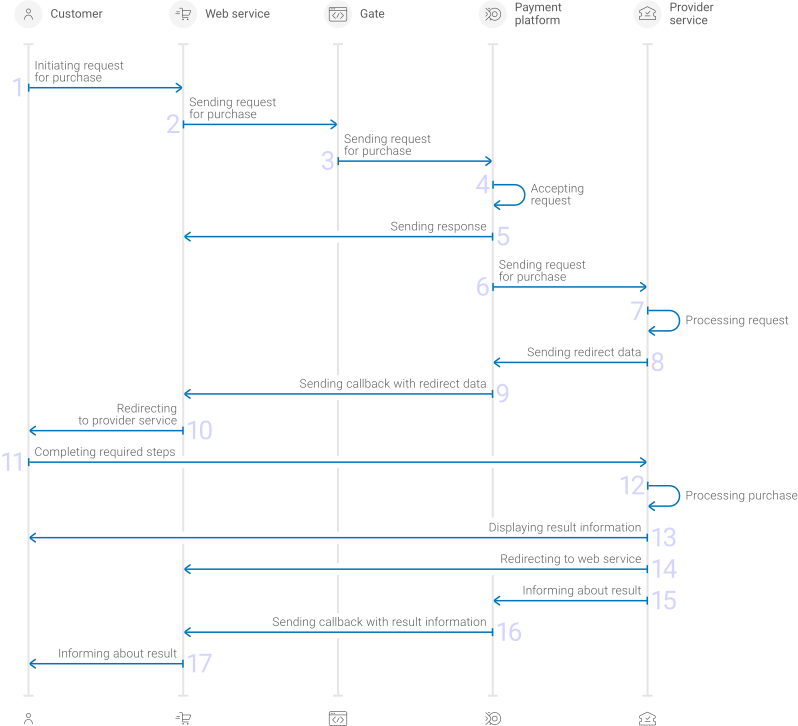
- A customer initiates a purchase by using the SberPay method in the web service.
- The web service sends the request for processing the purchase by using Gate to the specified EtoPlatezhi URL.
- The payment platform receives the request.
- The payment platform validates the required parameters and signature in the request.
- The payment platform sends the response to the web service with information about the receipt of the request and its validity (details).
- The payment platform performs further processing of the request (with parameter consistency check) and sends it to the provider service.
- The request is processed on the provider service side.
- The provider service sends the redirection data to the payment platform.
- The payment platform sends the callback with the redirection data to the web service.
- The customer is redirected to the provider service.
- The customer completes all required payment steps.
- The purchase is processed in the provider service.
- The result is displayed to the customer.
- The customer is redirected to the web service.
- The provider service sends the payment result notification to the payment platform.
- The payment platform sends the payment result callback to the web service.
- The customer receives the payment result information from the web service.
Information about the formats of requests and callbacks used for processing payments by using the SberPay method via Gate is presented further in this section. General information about working with the Gate API is presented in Interaction concepts.
Request format
There are several things you need to consider when sending purchase requests by using the SberPay method:
- To initiate each purchase, send a separate POST request to the /v2/payment/sberpay/sale endpoint.
- Each request must include the following objects and parameters:
- Object
general—general purchase information:project_id—project identifier obtained from EtoPlatezhi during integrationpayment_id—payment identifier unique within the projectsignature—request signature generated after all required parameters are specified (details—in the Signature generation and verification) (details)
- Object
payment—payment information:amount—payment amount in the smallest currency unitcurrency—payment currency code in the ISO-4217 alpha-3 format
- Object
customer—customer information:id—customer identifier unique within the projectip_address—customer IP address relevant for the initiated payment
- Object
account—customer account information:number—customer phone number
- Object
- The currency of the payment can only be RUB.
- Additionally, any other parameters included in the specification can be used.
Thus, a correct purchase request by using the SberPay method must contain the project identifier, basic payment information (identifier, amount, and currency code), customer identifier, IP address and phone number, signature, as well as possible additional parameters.
{
  "general": {
    "project_id": 210,
    "payment_id": "test_payment",
    "signature": "PJkV8ej\/UG0Di8hTng6JvipTv+AWoXW\/9MTO8yJA=="
  },
  "payment": {
    "amount": 1000,
    "currency": "RUB"
  },
  "customer": {
    "id": "customer123",
    "ip_address": "192.0.2.0"
  },
  "account": {
    "number": "+71231234567"
  }
}
{
  "general": {
    "project_id": 210,
    "payment_id": "test_payment",
    "signature": "PJkV8ej\/UG0Di8hTng6JvipTv+AWoXW\/9MTO8yJA=="
  },
  "payment": {
    "amount": 1000,
    "currency": "RUB"
  },
  "customer": {
    "id": "customer123",
    "ip_address": "192.0.2.0"
  },
  "account": {
    "number": "+71231234567"
  }
}
Formats of intermediate callbacks for customer redirection
Each payment made with the SberPay method requires redirection of customers from the merchant's web service to the provider service. To redirect a customer it is necessary to receive an intermediate callback from the payment platform and use the information included in the redirect_data object. The format of such callbacks is standard (details), and the following objects and parameters are included in the redirect_data object:
body—object with data to be sent in the request bodymethod—parameter specifying the HTTP method for sending the request (GETorPOST)url—parameter containing a link for redirection
  "redirect_data": {
    "body": {},
    "method": "GET",
    "url": "https://www.example.com/pay"
  }
Final callback format
The SberPay method uses the standard format for callbacks to deliver purchase results. For more information, see Handling callbacks (details).
The following is the example of a callback with information about a 1,000.00 RUB purchase made in the 129103 project.
 {
        "customer": {
            "id": "f4d68g5f"
        },
        "project_id": 129103,
        "payment": {
            "id": "testtoo0003",
            "type": "purchase",
            "status": "success",
            "date": "2025-06-19T10:39:26+0000",
            "method": "sberpay",
            "sum": {
                "amount": 100000,
                "currency": "RUB"
            },
            "description": ""
        },
        "operation": {
            "sum_initial": {
                "amount": 100000,
                "currency": "RUB"
            },
            "sum_converted": {
                "amount": 100000,
                "currency": "RUB"
            },
            "code": "0",
            "message": "Success",
            "provider": {
                "id": 18301,
                "payment_id": "71b83839-4514220488",
                "auth_code": ""
            },
            "id": 5023372010140727,
            "type": "sale",
            "status": "success",
            "date": "2025-06-19T10:39:26+0000",
            "created_date": "2025-06-19T10:37:20+0000",
            "request_id": "9d8138a67b35b0402779e9f40beffd7f3-05023373"
        },
        "signature": "KmV6HLSQFVZTR3lZKYDHh5fbbraumHyfOunD9MiP+PA=="
    }
}
The following is the example of a callback with information about a declined purchase.
Useful links
The following articles can be useful when implementing purchases via Gate:
- Interaction concepts—about the interaction with the payment platform by using Gate.
- Signature generation and verification—about the procedure of generating and verifying signatures in requests and callbacks.
- Payment processing—about the types, processing models, and possible statuses of supported payments and operations.
- One-time one-step purchase—about processing of one-time one-step purchases with immediate debiting of funds by using Gate.
- Handling operation processing information—about error and response codes that are used in the payment platform to record information about performing of operations.
COF purchases by using Gate
General information
COF purchases using SberPay is a way of making COF purchases with debit requests or making recurring transactions using stored credentials. For more information about COF purchases, see On-demand COF purchase.
Information about the formats of requests used for processing payments by using the SberPay method via Gate is presented further in this section. General information about working with the Gate API is presented in Interaction concepts.
COF purchase registration
To register a COF purchase by using Gate, the merchant is required to send a request for purchase with all the required parameters (including the register parameter of the recurring object, set to the value true) to the EtoPlatezhi URL and get the callback with the payment result from the payment platform. To register a regular payment the request should also contain information about the frequency, amount, start and end dates of regular payments. Note that if you specify any other value in the register parameter, a one-time payment will be made, and recurring payments will not be registered.
The COF purchase registration callback contains the identifier of the COF purchase, which can be used to make regular payments.
For more information about purchase processing by using Gate, see Purchases by using Gate.
Thus, a correct COF purchase registration request by using the SberPay method must contain the project identifier, basic payment information (payment identifier, amount, and currency code), customer identifier and IP address, the registration parameter and the conditions for regular payments, as well as signature.
 {
  "general": {
    "project_id": 208,
    "payment_id": "TEST_15427007172789",
    "signature": "DH0v2pZnkK9hwytOqrWdbltzO5GMSkzd0Iq6lM2...==",
  },
  "customer": {
    "ip_address": "192.0.2.0",
    "id": "123"
  },
  "payment": {
    "amount": 1000,
    "currency": "RUB",
    "description": "example reason"
  },
  "account": {
    "number": "+71231234567"
  },
  "recurring": {
    "register": true
  }
}
 {
  "general": {
    "project_id": 208,
    "payment_id": "TEST_15427007172789",
    "signature": "DH0v2pZnkK9hwytOqrWdbltzO5GMSkzd0Iq6lM2...==",
  },
  "customer": {
    "ip_address": "192.0.2.0",
    "id": "123"
  },
  "payment": {
    "amount": 1000,
    "currency": "RUB",
    "description": "example reason"
  },
  "account": {
    "number": "+71231234567"
  },
  "recurring": {
    "register": true
  }
}
Format of requests for COF purchase processing
Once a COF payment has been registered, to initiate the recurring payment, you must send a request to the payment platform with the COF purchase ID, which you previously received in the callback after registering the COF purchase.
You initiate COF purchase by sending a recurring request to the payment platform.
There are several things you must consider when processing COF purchases performing by using the SberPay method:
- To process each purchase, send a separate POST request to the /v2/payment/sberpay/recurring endpoint.
- Each request must include the following objects and parameters:
- Object
general—general purchase information:project_id—project identifier obtained from EtoPlatezhi during integrationpayment_id—payment identifier unique within the projectsignature—request signature generated after all required parameters are specified (details—in the Signature generation and verification) (details)
- Object
payment—payment information:amount—payment amount in the smallest currency unitcurrency—payment currency code in the ISO-4217 alpha-3 format
- Object
customer—customer information:ip_address—customer IP address relevant for the initiated payment
- Object
account—customer account information:number—customer phone number
- Object
recurring—COF purchase information:id—registered COF purchase identifier
- Object
- The currency of the payment can only be RUB.
- Additionally, any other parameters included in the specification can be used.
Thus, a correct purchase request by using the SberPay method must contain the project identifier, basic payment information (payment identifier, amount, and currency code), customer IP address, COF purchase identifier, as well as signature.
 {
  "general": {
    "project_id": 208,
    "payment_id": "TEST_15427007172789",
    "signature": "DH0v2pZnkK9hwytQ6bltzO5GMSkzd0Iq6lM2...==",
  },
  "customer": {
    "ip_address": "192.0.2.0"
  },
  "payment": {
    "amount": 1000,
    "currency": "RUB"
  },
  "account": {
    "number": "+71231234567"
  },
  "recurring": {
    "id": 1234567890
  }
}
 {
  "general": {
    "project_id": 208,
    "payment_id": "TEST_15427007172789",
    "signature": "DH0v2pZnkK9hwytQ6bltzO5GMSkzd0Iq6lM2...==",
  },
  "customer": {
    "ip_address": "192.0.2.0"
  },
  "payment": {
    "amount": 1000,
    "currency": "RUB"
  },
  "account": {
    "number": "+71231234567"
  },
  "recurring": {
    "id": 1234567890
  }
}
Useful links
The following articles can be useful when implementing purchases via Gate:
- Interaction concepts—about the interaction with the payment platform by using Gate.
- Signature generation and verification—about the procedure of generating and verifying signatures in requests and callbacks.
- Payment processing—about the types, processing models, and possible statuses of supported payments and operations.
- One-step purchase—about processing of one-time one-step purchases with immediate debiting of funds by using Gate.
- Handling operation processing information—about error and response codes that are used in the payment platform to record information about performing of operations.
Refunds by using Gate
General information
To perform a refund through Gate by using the SberPay method, send a request with all required parameters and signature to the EtoPlatezhi URL and receive a callback with the result. The full sequence and special aspects of refund performing are provided below.
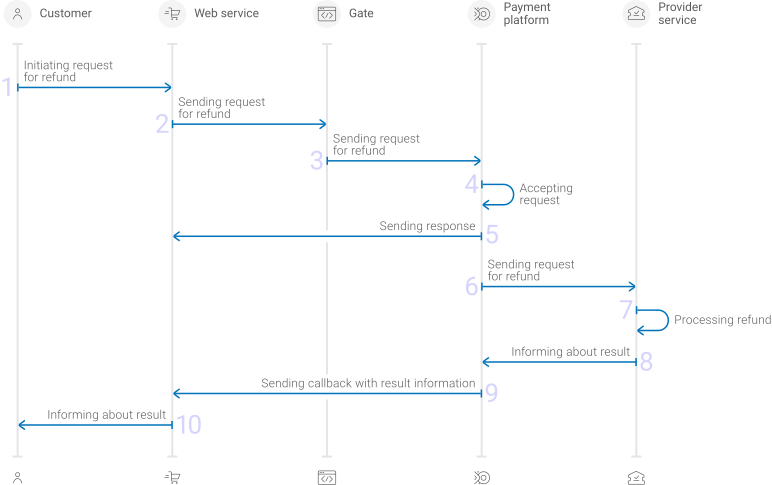
- A customer initiates a refund.
- The web service sends the request for performing the refund by using Gate to the specified EtoPlatezhi URL.
- The payment platform receives the request.
- The payment platform validates the required parameters and signature in the request.
- The payment platform sends the response to the web service with information about the receipt of the request and its validity (details).
- The payment platform performs further processing of the request (with parameter consistency check) and sends it to the provider service.
- The refund is processed on the side of the provider service.
- The provider service sends the result notification to the payment platform.
- The payment platform sends the result callback to the web service.
- The customer receives the refund result information from the web service.
Information about the formats of requests and callbacks used for performing refunds by using the SberPay method via Gate is presented further in this section. General information about working with the Gate API is presented in Interaction concepts.
Request format
There are several things you need to consider when sending refund requests by using the SberPay method:
- To initiate each refund, send a separate POST request to the /v2/payment/sberpay/refund endpoint.
- Each request must include the following objects and parameters:
- Object
general—general refund information:project_id—project identifier obtained from EtoPlatezhi during integrationpayment_id—identifier of the payment that needs to be refundedpayment identifiersignature—request signature generated after all required parameters are specified (details—in the Signature generation and verification)
- Object
payment—refund information:description—refund description or comment
- Object
customer—customer information:ip_address—customer IP address relevant for the initiated refund
- Object
- Additionally, any other parameters included in the specification can be used.
Thus, a correct refund request by using the SberPay method must contain the project and payment identifiers, description of the refund, the customer IP address and signature.
{
  "general": {
    "project_id": 210,
    "payment_id": "test_payment",
    "signature": "PJkV8ej\/UG0Di8hTng6JvipTv+AWoXW\/9MTO8yJA=="
  },
  "payment": {
    "description": "test refund"
  },
  "customer": {
    "ip_address": "192.0.2.0"
  }
}
{
  "general": {
    "project_id": 210,
    "payment_id": "test_payment",
    "signature": "PJkV8ej\/UG0Di8hTng6JvipTv+AWoXW\/9MTO8yJA=="
  },
  "payment": {
    "description": "test refund"
  },
  "customer": {
    "ip_address": "192.0.2.0"
  }
}
Callback format
The SberPay method uses the standard format for callbacks to deliver refund results. For more information, see Handling callbacks.
The following is the example of a callback with information about a 100.00 RUB refund made in the 1037 project.
{
    "project_id": 1037,
    "payment": {
        "id": "62153051",
        "type": "purchase",
        "status": "refunded",
        "date": "2024-06-15T13:21:51+0000",
        "method": "sberbank",
        "sum": {
            "amount": 10000,
            "currency": "RUB"
        },
        "description": "Test sale"
    },
    "customer": {
        "id": "1234"
    },
    "operation": {
        "id": 63,
        "type": "refund",
        "status": "success",
        "date": "2024-06-15T14:23:56+0000",
        "created_date": "2024-06-15T14:22:51+0000",
        "request_id": "ea2e5888a65cf1b1f2b5-00000003",
        "sum_initial": {
            "amount": 10000,
            "currency": "RUB"
        },
        "sum_converted": {
            "amount": 10000,
            "currency": "RUB"
        },
        "code": "0",
        "message": "Success",
        "provider": {
            "id": 1782,
            "payment_id": "7C035795EJ562523A",
            "date": "2024-06-15T14:23:51+0000"
        }
    },
    "signature": "uU6LOpEjEqxeqJ2GsDkDnaY+1p1m4aS5zTPkJA=="
}
The following is the example of a callback with information about a declined refund.
{
    "project_id": 1037,
    "payment": {
        "id": "59375393",
        "type": "purchase",
        "status": "success",
        "date": "2024-06-15T14:23:56+0000",
        "method": "sberbank",
        "sum": {
            "amount": 10000,
            "currency": "RUB"
        },
        "description": "Test sale"
    },
    "customer": {
        "id": "1234"
    },
    "operation": {
        "id": 84,
        "type": "refund",
        "status": "decline",
        "date": "2024-06-15T14:23:56+0000",
        "created_date": "2024-06-15T14:23:56+0000",
        "request_id": "776d5d3e602912e88858c922e34e5-00000001",
        "sum_initial": {
            "amount": 10000,
            "currency": "RUB"
        },
        "sum_converted": {
            "amount": 10000,
            "currency": "RUB"
        },
        "code": "20000",
        "message": "General decline",
        "provider": {
            "id": 1782,
            "payment_id": "",
            "date": ""
        }
    },
    "signature": "qjVnKRZX51lrxh5kqCzurbJbQQSAeFwqH7H9gk7gUYI3A=="
}
Useful links
The following articles can be useful when implementing refunds via Gate:
- Interaction concepts—about the interaction with the payment platform by using Gate.
- Signature generation and verification—about the procedure of generating and verifying signatures in requests and callbacks.
- Payment processing—about the types, processing models, and possible statuses of supported payments and operations.
- Purchase refunds—about performing of refunds by using Gate.
- Handling operation processing information—about error and response codes that are used in the payment platform to record information about performing of operations.
Refunds by using Dashboard
When working with Dashboard, you can perform single and mass refunds by using the SberPay method.
- To perform a single refund, select the target purchase, open its information tab, specify the amount of the refund, send a request and verify that the refund has been performed.
-
To perform a mass refund, prepare and upload a file with information about all target refunds, send a batch request, and verify that the refunds have been performed.
Use a CSV file structured according to the requirements presented in the Mass payments data section. The refund parameters must comply with the requirements (you do not have to generate a signature because it is specified by Dashboard).
More information Information about performing refunds by using Dashboard is presented in a separate section.
Analysis of payments results
To analyse information about payments made with the SberPay method and other methods, you can use:
- Dashboard interface toolkit with various lists and analytic panels.
- Reports in CSV file format, available via the Reports section (one-time and periodically).
- Data in JSON format, sent by program requests to a specified URL available by using the Data API interface.
If you have any questions, refer to the documentation (Dashboard and Using Data API) and EtoPlatezhi technical support.