Purchase
The customer scans the QR code or clicks the button on the checkout page or in your system (when performing the purchase by using Gate). After that, the customer is redirected to mobile app to complete the purchase.
| Countries and regions | Belarus |
| Payment currencies | BYN |
| Payment amount limits | Contact your key account manager at EtoPlatezhi for details. Also you can check the payment amount limits in your project by using Dashboard. |
| Payment processing time | Contact your key account manager at EtoPlatezhi for details. |
| Currency conversion |  |
| Refund | |
| Onboarding and access fee | Contact your key account manager at EtoPlatezhi for details. |
| Special considerations | |
Operations support
| Interfaces | |||
|---|---|---|---|
| Payment Page | Gate | Dashboard | |
| Purchase |  |
|
|
You can check the payment amount limits in your project by using Dashboard. To check your payment amount limits, go to Dashboard, select the Projects section, and then click the Payment methods tab.
The following sections provide more information about the payment processing flow and the analysis of completed payments.
Purchase by using Payment Page
General information
To perform a purchase by using Payment Page with the SSIS RASCHET (ERIP) payment method:
- Send a request with all the required parameters and signature to the EtoPlatezhi URL.
- Accept the callback with the purchase result from the payment platform.
The following figure shows the complete purchase processing flow in the SSIS RASCHET (ERIP) payment method.
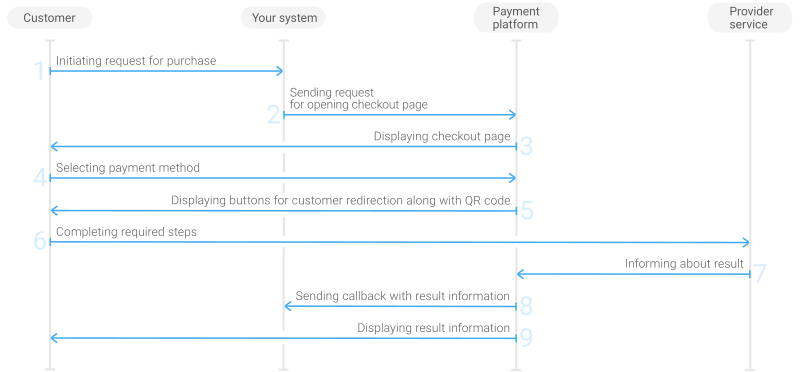
- The customer initiates a purchase in your system.
- Your system sends the request for the purchase through Payment Page to the EtoPlatezhi URL.
- The checkout page is displayed to the customer.
- The customer chooses to make a purchase with the SSIS RASCHET (ERIP) payment method.
- The checkout page displays the buttons for customer redirection along with the QR code to the customer.
- The customer scans the QR code or clicks the button. After that, the customer is redirected to mobile app to complete the purchase.
- The provider service sends the purchase result information to the payment platform.
- The payment platform sends a callback with the payment result to your system.
- The payment platform displays the payment result to the customer on the checkout page.
Request
The following table lists the parameters that you have to include in the request for purchase through the checkout page with the SSIS RASCHET (ERIP) payment method.
|
||
|---|---|---|
| Parameter | Description | |
project_id | Project ID you obtained from EtoPlatezhi when integrating. Example: | |
payment_id | Payment ID unique within your project. Example: | |
customer_id | Unique ID of the customer within your project. Example: | |
customer_first_name | Customer's first name. Example: | |
customer_last_name | Customer's last name. Example: | |
customer_email | Customer's email. Example: | |
payment_currency | Code of the payment currency in the ISO-4217 alpha-3 format.
The currency of the payment can be only BYN. Example: | |
payment_amount | Payment amount in minor currency units without any decimal point or comma except for the cases when the currency doesn't have any minor currency units. If the currency doesn't have any minor units (i.e. the number of digits for minor currency units is zero), set this parameter to the amount in the major currency units. To check whether the currency has any minor units, see Currency units and Currency codes. Example: 10.00 BYN must be sent as | |
force_payment_method | Parameter that allows you to enforce the SSIS RASCHET (ERIP) payment method for your customer and skip the page with payment method selections. To enforce the SSIS RASCHET (ERIP) payment method and skip the page with payment method selection, add the force_payment_method parameter to the request and set its value to Example: | |
signature | Signature created after you've specified all the request parameters. For more information about signature generation, see Signature generation and verification. | |
| You can also add any other optional parameters to the request, if necessary. For the list of all the parameters possible in requests to Payment Page, see Parameters for opening the payment form. | ||
Here is an example of the data from a request to open the checkout page by using
EPayWidget:
EPayWidget.run(
	{
		project_id: 1234,
		payment_id: 'payment_47',
		customer_id: 'customer_123',
		customer_first_name: 'John',
		customer_last_name: 'Doe',
		customer_email: 'johndoe@example.com',
		payment_currency: 'BYN',
		payment_amount: 1000,
		force_payment_method: 'erip',
		signature: 'kUi2x9dKHAVNU0FYldJrxh4yo+52Kt8KU+Y19vySO/RLUkDJrOcZzUCwX6R/ekpZhkIQg=='
	}
)
Callback
In the SSIS RASCHET (ERIP) payment method, the payment platform returns the purchase result in a callback. For the information about the callback structure, see Callbacks.
The following is an example of a callback body with information about a successfully completed purchase.
{
    "project_id": 1234,
    "payment": {
        "id": "payment_47",
        "type": "purchase",
        "status": "success",
        "date": "2024-12-07T19:08:45+0000",
        "method": "erip",
        "sum": {
            "amount": 1000,
            "currency": "BYN"
        },
        "description": ""
    },
    "customer": {
        "id": "customer_123"
    },
    "operation": {
        "id": 47,
        "type": "sale",
        "status": "success",
        "date": "2024-12-07T19:08:45+0000",
        "created_date": "2024-12-07T19:08:05+0000",
        "request_id": "1a23456bc7890de",
        "sum_initial": {
            "amount": 1000,
            "currency": "BYN"
        },
        "sum_converted": {
            "amount": 1000,
            "currency": "BYN"
        },
        "code": "0",
        "message": "Success",
        "provider": {
            "id": 12345,
            "payment_id": "123abc123-123",
            "auth_code": ""
        }
    },
    "signature": "U7HQO7ToISZhMPKdM4XrUKQtoYzFvoB3cs9CRd4xeYG2Q=="
}
The following is an example of a callback for a declined purchase.
{
    "project_id": 1234,
    "payment": {
        "id": "payment_47",
        "type": "purchase",
        "status": "decline",
        "date": "2024-12-07T19:08:45+0000",
        "method": "erip",
        "sum": {
            "amount": 1000,
            "currency": "BYN"
        },
        "description": ""
    },
    "customer": {
        "id": "customer_123"
    },
    "operation": {
        "id": 47,
        "type": "sale",
        "status": "decline",
        "date": "2024-12-07T19:08:45+0000",
        "created_date": "2024-12-07T19:08:05+0000",
        "request_id": "1a23456bc7890de",
        "sum_initial": {
            "amount": 1000,
            "currency": "BYN"
        },
        "sum_converted": {
            "amount": 1000,
            "currency": "BYN"
        },
        "code": "20000",
        "message": "General decline",
        "provider": {
            "id": 12345,
            "payment_id": "123abc123-123",
            "auth_code": ""
        }
    },
    "signature": "U7HQO7ToISZhMPKdM4XrUKQtoYzFvoB3cs9CRd4xeYG2Q=="
}
Purchase by using Gate
General information
To perform a purchase by using Gate with the SSIS RASCHET (ERIP) payment method:
- Send a request with all the required parameters and signature to the EtoPlatezhi URL.
- Show the screen with the mobile app buttons and the QR code to the customer.
- Accept the callback with the purchase result from the payment platform.
The following figure provides the details of the purchase processing flow in the SSIS RASCHET (ERIP) payment method.
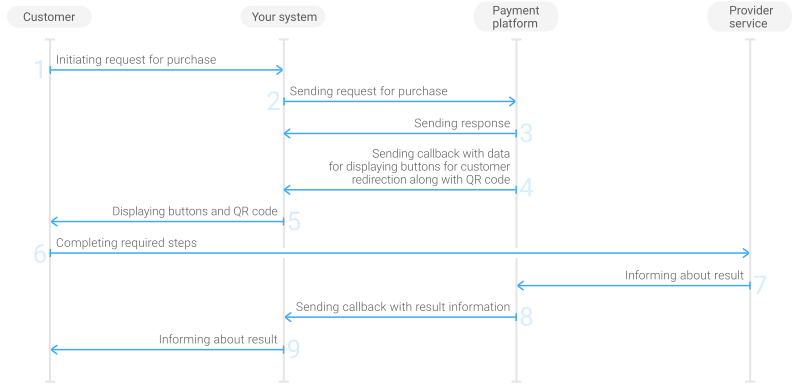
- The customer initiates a purchase in your system.
- Your system sends the purchase request to the EtoPlatezhi payment platform.
- The payment platform sends you a response in which it acknowledges your request and provides the request validation result. (For more information about the response format, see Response format.)
- The payment platform forwards the app deep links and the QR code to your system in the display_data array.
- Your system displays the buttons for customer redirection along with the QR code to the customer.
- The customer scans the QR code or clicks the button. After that, the customer is redirected to mobile app to complete the purchase.
- The provider service informs the payment platform about the purchase result.
- The payment platform sends the callback with the payment result to your system.
- Your system sends the payment result to the customer.
Request
This section provides the instructions on how to build the request for purchase with the SSIS RASCHET (ERIP) payment method.
| HTTP request method | POST |
| Request body format | JSON |
| API endpoint | /v2/payment/erip/sale |
|
|||
|---|---|---|---|
| Object | Parameter | Description | |
general | project_id | Project ID you obtained from EtoPlatezhi when integrating. Example: | |
payment_id | Payment ID unique within your project. Example: | ||
signature | Signature created after you've specified all the request parameters. For more information about signature generation, see Signature generation and verification. | ||
customer | id | Unique ID of the customer within your project. Example: | |
ip_address | IP address of the customer's device. Example: | ||
first_name | Customer's first name. Example: | ||
last_name | Customer's last name. Example: | ||
email | Customer's email. Example: | ||
payment | currency | Code of the payment currency in the ISO-4217 alpha-3 format. The currency of the payment can be only BYN. Example: | |
amount | Payment amount in minor currency units without any decimal point or comma except for the cases when the currency doesn't have any minor currency units. If the currency doesn't have any minor units (i.e. the number of digits for minor currency units is zero), set this parameter to the amount in the major currency units. To check whether the currency has any minor units, see Currency units and Currency codes. Example: 10.00 BYN must be sent as | ||
| You can also add any other optional parameters to the purchase request, if necessary. For the list of all the parameters available in Gate, see API Reference. | |||
Here is an example of the data from a request to initiate a purchase with the SSIS RASCHET (ERIP) payment method:
{
    "general": {
        "project_id": 1234,
        "payment_id": "payment_47",
        "signature": "kUi2x9dKHAVNU0FYldJrxh4yo+52Kt8KU+Y19vySO/RLUkDJrOcZzUCwX6R/ekpZhkIQg=="
    },
    "customer": {
        "id": "customer_123",
        "ip_address": "198.51.100.47",
        "first_name": "John",
        "last_name": "Doe",
        "email": "johndoe@example.com"
    },
    "payment": {
        "currency": "BYN",
        "amount": 1000
    }
}
Displaying the payment instructions to the customer
After receiving and processing your purchase request, the payment platform sends you the callback with the data for displaying the payment instructions to the customer.
Use the data from the display_data array to display the payment instructions to the customer.
| Element | Description |
|---|---|
{
    "type": "qr_img",
    "title": "qr_img",
    "data": "data:image/png;base64, iVBORw0KGgoAAAANSUhEUgAAALIAAACyAQA="
}
|
The data that should be displayes as the QR code. Example: |
{
    "type": "deep_link",
    "title": "deep_link",
    "data": "MDAwMjAxMDEwMjEyMzI1N..."
}
|
The end of the link (URL) for opening the provider mobile app for payment. The initial part of the link, which includes the URL of the required bank, must be preppended by your system. Example: |
The following is the callback fragment containing display_data array.
"display_data": [
    {
        "type": "qr_img",
        "title": "qr_img",
        "data": "data:image/png;base64, iVBORw0KGgoAAAANSUhEUgAAALIAAACyAQA="
    },
    {
        "type": "deep_link",
        "title": "deep_link",
        "data": "MDAwMjAxMDEwMjEyMzI1N..."
    }
]
Callback
In the SSIS RASCHET (ERIP) payment method, the payment platform returns the purchase result in a callback. For the information about the callback structure, see Callbacks.
The following is an example of a callback body with the information about a successfully completed purchase.
{
    "project_id": 1234,
    "payment": {
        "id": "payment_47",
        "type": "purchase",
        "status": "success",
        "date": "2024-12-07T19:08:45+0000",
        "method": "erip",
        "sum": {
            "amount": 1000,
            "currency": "BYN"
        },
        "description": ""
    },
    "customer": {
        "id": "customer_123"
    },
    "operation": {
        "id": 47,
        "type": "sale",
        "status": "success",
        "date": "2024-12-07T19:08:45+0000",
        "created_date": "2024-12-07T19:08:05+0000",
        "request_id": "1a23456bc7890de",
        "sum_initial": {
            "amount": 1000,
            "currency": "BYN"
        },
        "sum_converted": {
            "amount": 1000,
            "currency": "BYN"
        },
        "code": "0",
        "message": "Success",
        "provider": {
            "id": 12345,
            "payment_id": "123abc123-123",
            "auth_code": ""
        }
    },
    "signature": "U7HQO7ToISZhMPKdM4XrUKQtoYzFvoB3cs9CRd4xeYG2Q=="
}
The following is an example of a callback for a declined purchase.
{
    "project_id": 1234,
    "payment": {
        "id": "payment_47",
        "type": "purchase",
        "status": "decline",
        "date": "2024-12-07T19:08:45+0000",
        "method": "erip",
        "sum": {
            "amount": 1000,
            "currency": "BYN"
        },
        "description": ""
    },
    "customer": {
        "id": "customer_123"
    },
    "operation": {
        "id": 47,
        "type": "sale",
        "status": "decline",
        "date": "2024-12-07T19:08:45+0000",
        "created_date": "2024-12-07T19:08:05+0000",
        "request_id": "1a23456bc7890de",
        "sum_initial": {
            "amount": 1000,
            "currency": "BYN"
        },
        "sum_converted": {
            "amount": 1000,
            "currency": "BYN"
        },
        "code": "20000",
        "message": "General decline",
        "provider": {
            "id": 12345,
            "payment_id": "123abc123-123",
            "auth_code": ""
        }
    },
    "signature": "U7HQO7ToISZhMPKdM4XrUKQtoYzFvoB3cs9CRd4xeYG2Q=="
}