Preselecting payment methods
Overview
By default, the customer's payment procedure on Payment Page begins at the step of selecting a payment method. However, in some cases, there is no need to display the payment form with the page for payment method selection. This may be the case when the customer selects a payment method in the merchant web service before opening Payment Page or when paying with a particular method is relevant for this merchant due to region- or customer-specific reasons and other factors.
The EtoPlatezhi payment platform provides the capability of opening Payment Page with the payment method that has been preselected by the customer or the merchant. With this functionality configured, the page for selecting a payment method is not displayed to the customer on the payment form. For a payment method to be preselected, this method is specified in the request for opening Payment Page—no additional actions are required for setting up this functionality.
The functionality of preselecting a payment method can be accompanied by other possible capabilities, which are relevant for certain payment methods and affect the Payment Page workflow, such as. Here are some of such capabilities in particular:
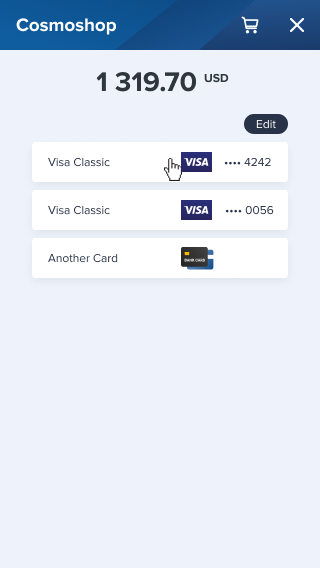
- Displaying details of saved cards issued for a certain payment system. With card payments, it is possible to limit the choice of cards that were previously saved by the customer. For this, the request for opening Payment Page should contain the identifier of the preferred payment system (for example, Mastercard or Visa). As a result, the customer payment procedure begins on the page with the list of the previously saved cards that were issued for the payment system specified in the request. If the customer has not saved the card data before or the list of saved cards does not contain the data the customer needs, the customer can specify the details of another card which can also be the card issued for a different payment system.
Special aspects
If you want to set up the functionality of preselecting a payment method, consider the following aspects:
- Preselecting a payment method is supported only for the methods that are available within the current project, otherwise, the request for opening Payment Page is declined.
- The customer cannot select a payment method different from the one that was specified in the request for opening Payment Page; this also applies to the procedure of payment retries—with a payment method preselected, the customer cannot select a payment method when making additional payment attempts within a single Payment Page session.
- If the request for opening Payment Page contains both a payment method and a token, the payment is processed with the use of this token and the information about the specified payment method is ignored.
Request format
The preselected payment method should be specified in the request for opening Payment Page. For this, the code of this payment method should be specified in the force_payment_method parameter in the request, while to preselect a payment method group, specify the code of the group in the force_payment_group parameter. For more information about the codes of the supported payment methods and groups, see this reference.
The following example illustrates the parameters passed in the request for making a purchase with the Alipay payment method.
{
   "project_id": 42,
   "payment_id": "456789",
   "payment_currency": "USD",
   "payment_amount": 131970,
   "customer_id": "customer_12",
   "force_payment_method": "alipay",  // payment method code
   "signature": "TSzdE5rJZaA9TYAKoGpfXriFf82MxF..."
 }
{
   "project_id": 42,
   "payment_id": "456789",
   "payment_currency": "USD",
   "payment_amount": 131970,
   "customer_id": "customer_12",
   "force_payment_method": "alipay",  // payment method code
   "signature": "TSzdE5rJZaA9TYAKoGpfXriFf82MxF..."
 }
- The
force_payment_methodparameter with the valuecard(the code of the card payment method) specified. - The
force_payment_method_subtypeparameter with the identifier of the payment system specified.
The list of the identifiers of the supported payment systems is provided in Payment card codes.
The following example illustrates the parameters passed in the request for making a payment with Mastercard specified as the preferred payment system.
{
   "project_id": 43,
   "payment_id": "456790",
   "payment_currency": "USD",
   "payment_amount": 131970,
   "customer_id": "customer_12",
   "force_payment_method": "card",  // payment method code
   "force_payment_method_subtype": "mastercard",   // payment system identifier
   "signature": "TSzdE5rJZaA9TYAKoGpfXriFf82MxF..."
 }
{
   "project_id": 43,
   "payment_id": "456790",
   "payment_currency": "USD",
   "payment_amount": 131970,
   "customer_id": "customer_12",
   "force_payment_method": "card",  // payment method code
   "force_payment_method_subtype": "mastercard",   // payment system identifier
   "signature": "TSzdE5rJZaA9TYAKoGpfXriFf82MxF..."
 }
Related links
- Payment method codes—the reference section with the list of codes for the supported payment methods.
- Payment card codes—the reference section with the list of identifiers for the supported payment systems.
- Parameters for opening the payment form—the section with the information about parameters that are used for opening Payment Page.