Card payments via partner (Russia)
Overview
Introduction
Card payments via partner (Russia) is a payment method which allows you to process payments in Russian rubles by using payment cards in Russia. This method supports purchases.
This article provides information about working with the Card payments via partner (Russia) method: general insights are presented in the Overview section, while information about the actions required to process payments and perform other actions is presented in the sections that follow.
General information
| Payment method type | Card payments |
|---|---|
| Payment instruments | payments cards |
| Countries and regions | RU |
| Payment currencies | RUB |
| Currency conversion | – |
| One-time purchases | + |
| Credential-on-file purchases | – |
| Full refunds | – |
| Partial refunds | – |
| Payouts | – |
| Chargebacks | – |
| Notes | – |
| Onboarding and access fee | refer to your EtoPlatezhi account manager |
Interaction diagram
Payment processing by using the Card payments via partner (Russia) method involves the merchant's web service, one of EtoPlatezhi interfaces, the EtoPlatezhi payment platform, and technical facilities of the partner service.
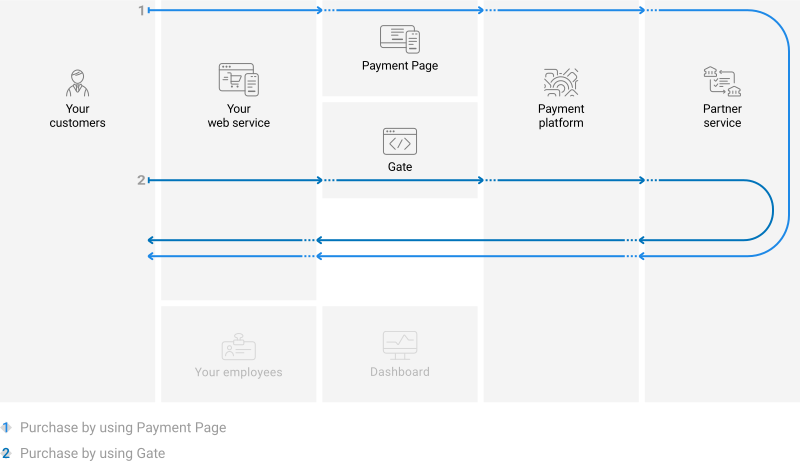
Operations support
Various platform interfaces can be used to process payments and perform operations using the Card payments via partner (Russia) method. Purchases can be processed by using Payment Page, Gate and Dashboard (using payment links). At the same time, regardless of the interfaces used, the following properties and limitations are applicable.
The following properties and limitations apply to the Card payments via partner (Russia) method.
| Amounts ¹ | Times ² | |||
|---|---|---|---|---|
| minimum | maximum | base | threshold | |
| Purchases | * | * | 1 minute | 48 hours |
- For the most recent amount limits, contact your EtoPlatezhi account manager.
- The base and threshold times are defined as follows:
- The base time is the average estimated time between the moment a payment is initiated in the payment platform to the moment the payment result is sent to the web service. The base time evaluation is made on the assumption of normal operation of all technical facilities and communication channels and typical customer behaviour (if any input from the customer is required). Use the base time to estimate when to react to the absence of payment result callbacks or when to check payment status (details).
- The threshold time is the maximum possible time between the moment a payment is initiated in the payment platform to the moment the web service receives the callback with the payment result. A payment is automatically assigned the
declinestatus if it wasn't processed within the threshold time. For individual customisation of the threshold time limit, contact EtoPlatezhi technical support.
Processing scenarios
To perform a purchase by using the Card payments via partner (Russia) method, you need to redirect the customer to the partner service.
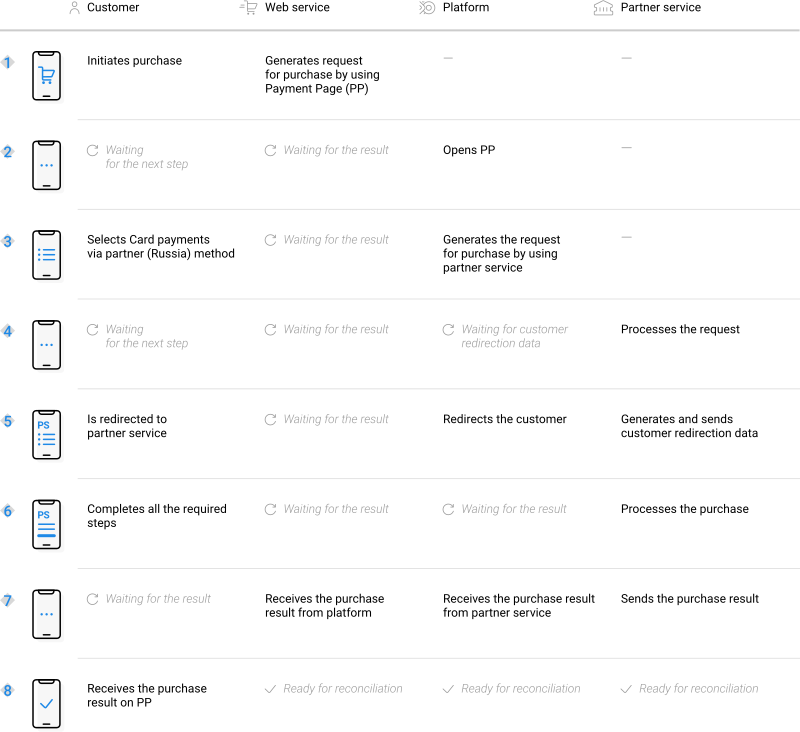
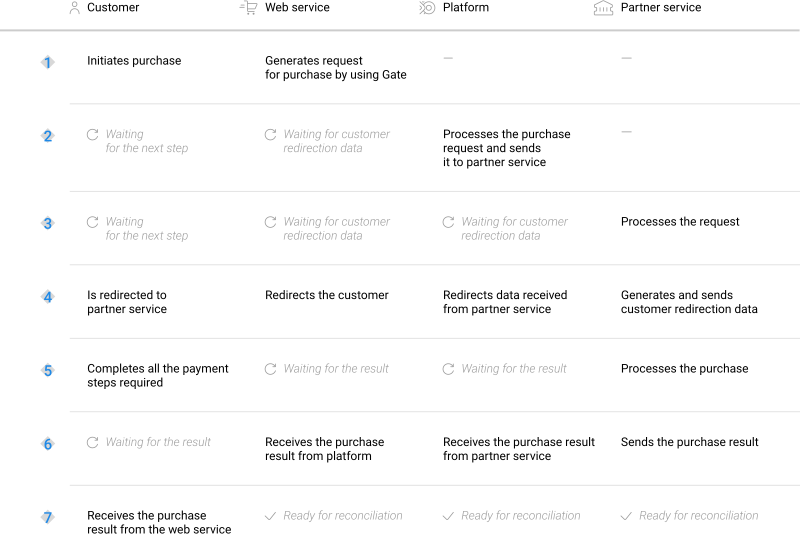
Scenarios for performing operations via the main interfaces of the payment platform correspond to those presented in the diagrams. Similarly, when additional features (such as purchases via payment links) are used, scenarios for performing operations also correspond to the specifics of those features.
Purchases by using Payment Page
General information
To process a purchase through Payment Page by using the Card payments via partner (Russia) method, the merchant's web service is required to send a request with all required parameters and signature to the EtoPlatezhi URL and receive a callback with the result. The full sequence and special aspects of purchase processing are provided below.
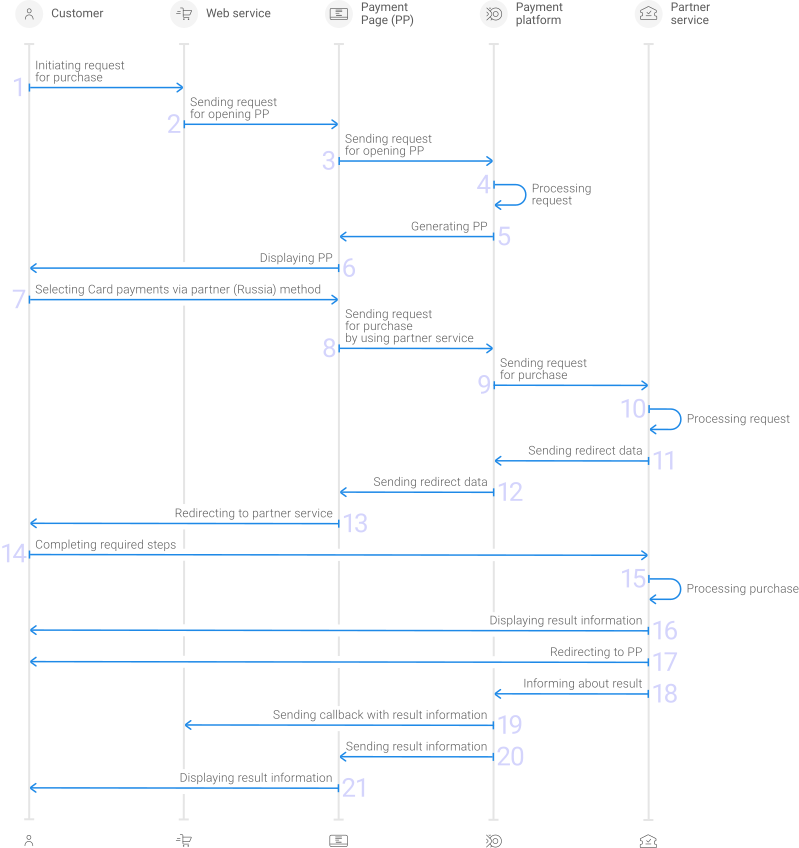
- A customer initiates a purchase in the web service.
- The web service sends the request for opening Payment Page to the specified EtoPlatezhi URL.
- The request for opening Payment Page is sent to the payment platform.
- The payment platform receives the request and validates the required parameters and signature.
- Payment Page is generated based on the project and request parameters.
- Payment Page is displayed to the customer.
- The customer selects the Card payments via partner (Russia) method.
- The payment platform receives the request for processing the payment by using the Card payments via partner (Russia) method.
- The payment platform processes the request and sends it to the partner service.
- The request is processed on the partner service side.
- The data for redirecting the customer to the partner service is sent from the partner service to the payment platform.
- The data for redirecting the customer is sent from the payment platform to Payment Page.
- The customer is redirected to the partner service.
- The customer completes all required payment steps.
- The purchase is processed in the partner service.
- The result information is displayed to the customer in the partner service.
- The customer is redirected to Payment Page.
- The partner service sends a notification about the result to the payment platform.
- The payment platform sends the payment result callback to the web service.
- The payment platform sends the result information to Payment Page.
- The result information is displayed to the customer on Payment Page.
Information about the formats of requests and callbacks used for processing payments by using the Card payments via partner (Russia) method via Payment Page is presented further in this section; general information about working with the Payment Page API is presented in Interaction concepts.
Request format
There are several things you need to consider when sending purchase requests by using the Card payments via partner (Russia) method:
- The following parameters required for any payment must be specified:
project_id—project identifier obtained from EtoPlatezhi during integrationpayment_id—payment identifier unique within the projectpayment_currency—payment currency code in the ISO-4217 alpha-3 formatpayment_amount—payment amount in the smallest currency unitcustomer_id—customer identifier unique within the project
- The following parameters required for any payment must be specified:
project_id,payment_id,payment_currency,payment_amount,customer_id. - The currency of the payment can only be RUB.
- If you need to have the payment form displayed with the Card payments via partner (Russia) method selected, set the
force_payment_methodparameter tocard-partner. - Additionally, any other parameters available for working with Payment Page can be used (details).
- After all target parameters are specified, generate a signature (details).
Thus, a correct request for opening the payment form using the Card payments via partner (Russia) method must contain the project identifier, basic payment information (identifier, amount, and currency code), customer identifier and signature, as well as possible additional parameters.
{
   "project_id": 120,
   "payment_id": "580",
   "payment_amount": 1000,
   "payment_currency": "RUB",
   "customer_id": "customer1",
   "signature": "kUi2x9dKHAVNU0FYldOcZzUCwX6R\/ekpZhkIQg=="
}
{
   "project_id": 120,
   "payment_id": "580",
   "payment_amount": 1000,
   "payment_currency": "RUB",
   "customer_id": "customer1",
   "signature": "kUi2x9dKHAVNU0FYldOcZzUCwX6R\/ekpZhkIQg=="
}
Callback format
The Card payments via partner (Russia) method uses the standard format for callbacks to deliver purchase results. For more information, see Handling callbacks (details).
The following is the example of a callback with information about a 1.00 RUB purchase made in the 129103 project.
{
        "customer": {
            "id": "111"
        },
        "project_id": 129103,
        "payment": {
            "id": "tetetest3",
            "type": "purchase",
            "status": "success",
            "date": "2025-09-08T14:08:22+0000",
            "method": "Card partner",
            "sum": {
                "amount": 100,
                "currency": "RUB"
            },
            "description": "test payment"
        },
        "operation": {
            "sum_initial": {
                "amount": 100,
                "currency": "RUB"
            },
            "sum_converted": {
                "amount": 100,
                "currency": "RUB"
            },
            "code": "0",
            "message": "Success",
            "provider": {
                "id": 19071,
                "payment_id": "574575bcfe9e4a7afcf",
                "auth_code": ""
            },
            "id": 5049143010143207,
            "type": "sale",
            "status": "success",
            "date": "2025-09-08T14:08:22+0000",
            "created_date": "2025-09-08T14:02:48+0000",
            "request_id": "1df725845c823e2d84-05049144"
        },
        "signature": "cShxY9q26j8LirXrqvd8KkGgLM9Zciw=="
    }
}
The following is the example of a callback with information about a declined purchase.
 {
        "customer": {
            "id": "customer123"
        },
        "project_id": 129103,
        "payment": {
            "id": "test_6payment",
            "type": "purchase",
            "status": "decline",
            "date": "2025-09-08T08:33:14+0000",
            "method": "Card partner",
            "sum": {
                "amount": 1000,
                "currency": "RUB"
            },
            "description": "test payment"
        },
        "operation": {
            "sum_initial": {
                "amount": 1000,
                "currency": "RUB"
            },
            "sum_converted": {
                "amount": 1000,
                "currency": "RUB"
            },
            "code": "20000",
            "message": "General decline",
            "provider": {
                "id": 19071,
                "payment_id": "5012826010142075",
                "auth_code": ""
            },
            "id": 5012826010142075,
            "type": "sale",
            "status": "decline",
            "date": "2025-09-08T08:33:14+0000",
            "created_date": "2025-09-08T08:33:11+0000",
            "request_id": "8931bec8434529cc87-05012827"
        },
        "signature": "2pH55MVWSLyTafwBKMFCLwXXiU0Ght+w=="
    }
}
Useful links
The following articles can be useful when implementing purchases via Payment Page:
- Interaction concepts—about the interaction with the payment platform by using Payment Page.
- Signature generation and verification—about the procedure of generating and verifying signatures in requests and callbacks.
- Payment processing—about the types, processing models, and possible statuses of supported payments and operations.
- Purchase processing—about processing of one-time one-step purchases with immediate debiting of funds by using Payment Page.
- Handling operation processing information—about error and response codes that are used in the payment platform to record information about performing of operations.
Purchases by using Gate
General information
To process a purchase through Gate by using the Card payments via partner (Russia) method, the merchant's web service is required to do the following:
- Send a request with all the required parameters and signature to the EtoPlatezhi URL.
- Receive an intermediate callback from the payment platform and redirect the customer to the partner service.
- Receive the final callback from the payment platform.
The full sequence and special aspects of purchase processing are provided below.
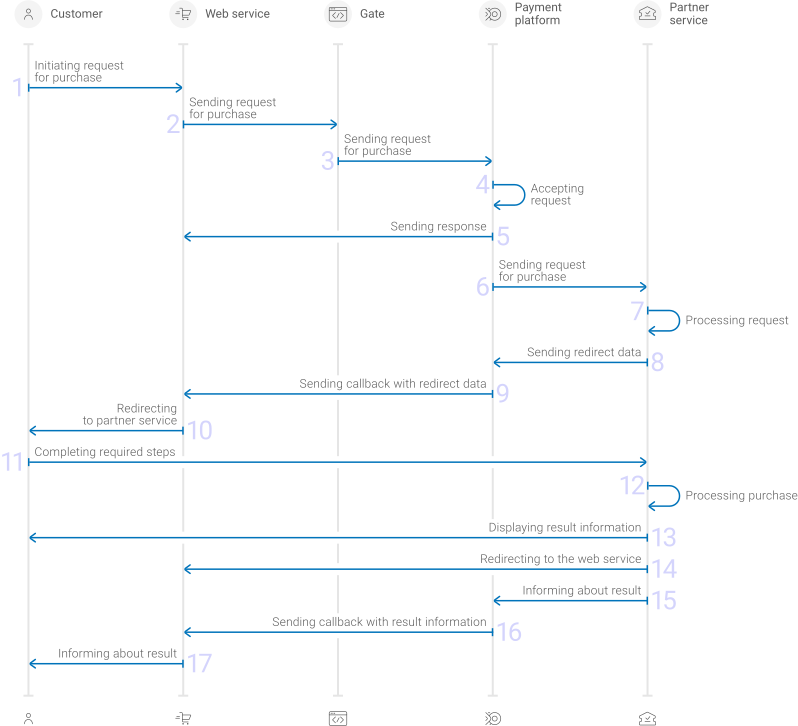
- A customer initiates a purchase by using the Card payments via partner (Russia) method in the web service.
- The web service sends the request for processing the purchase by using Gate to the specified EtoPlatezhi URL.
- The payment platform receives the request.
- The payment platform validates the required parameters and signature in the request.
- The payment platform sends the response to the web service with information about the receipt of the request and its validity (details).
- The payment platform performs further processing of the request (with parameter consistency check) and sends it to the partner service.
- The request is processed on the partner service side.
- The partner service sends the redirection data to the payment platform.
- The payment platform sends the callback with the redirection data to the web service.
- The customer is redirected to the partner service.
- The customer completes all required payment steps.
- The purchase is processed in the partner service.
- The result is displayed to the customer.
- The customer is redirected to the web service.
- The partner service sends the payment result notification to the payment platform.
- The payment platform sends the payment result callback to the web service.
- The customer receives the payment result information from the web service.
Information about the formats of requests and callbacks used for processing payments by using the Card payments via partner (Russia) method via Gate is presented further in this section. General information about working with the Gate API is presented in Interaction concepts.
Request format
There are several things you need to consider when sending purchase requests by using the Card payments via partner (Russia) method:
- To initiate each purchase, send a separate POST request to the
/v2/payment/card-partner/saleendpoint. - Each request must include the following objects and parameters:
- Object
general—general purchase information:project_id—project identifier obtained from EtoPlatezhi during integrationpayment_id—payment identifier unique within the projectsignature—request signature generated after all required parameters are specified (details—in the Signature generation and verification) (details)
- Object
payment—payment information:amount—payment amount in the smallest currency unitcurrency—payment currency code in the ISO-4217 alpha-3 format
- Object
customer—customer information:id—customer identifier unique within the projectip_address—customer IP address relevant for the initiated payment
- Object
- The currency of the payment can only be RUB.
- Additionally, any other parameters included in the specification can be used.
Thus, a correct purchase request by using the Card payments via partner (Russia) method must contain the project identifier, basic payment information (identifier, amount, and currency code), customer identifier and IP address, signature, as well as possible additional parameters.
{
  "general": {
    "project_id": 210,
    "payment_id": "test_payment",
    "signature": "PJkV8ej\/UG0Di8hTng6JvipTv+AWoXW\/9MTO8yJA=="
  },
  "payment": {
    "amount": 1000,
    "currency": "RUB"
  },
  "customer": {
    "id": "customer123",
    "ip_address": "192.0.2.0"
  }
}
{
  "general": {
    "project_id": 210,
    "payment_id": "test_payment",
    "signature": "PJkV8ej\/UG0Di8hTng6JvipTv+AWoXW\/9MTO8yJA=="
  },
  "payment": {
    "amount": 1000,
    "currency": "RUB"
  },
  "customer": {
    "id": "customer123",
    "ip_address": "192.0.2.0"
  }
}
Formats of intermediate callbacks for customer redirection
Each payment made with the Card payments via partner (Russia) method requires redirection of customers from the merchant's web service to the Card payments via partner (Russia) service. To redirect a customer it is necessary to receive an intermediate callback from the payment platform and use the information included in the redirect_data object. The format of such callbacks is standard (details), and the following objects and parameters are included in the redirect_data object:
body—object with data to be sent in the request bodymethod—parameter specifying the HTTP method for sending the request (GETorPOST)url—parameter containing a link for redirection
  "redirect_data": {
    "body": {},
    "method": "GET",
    "url": "https://www.example.com/pay"
  }
Final callback format
The Card payments via partner (Russia) method uses the standard format for callbacks to deliver purchase results. For more information, see Handling callbacks (details).
The following is the example of a callback with information about a 1.00 RUB purchase made in the 129103 project.
{
        "customer": {
            "id": "111"
        },
        "project_id": 129103,
        "payment": {
            "id": "tetetest3",
            "type": "purchase",
            "status": "success",
            "date": "2025-09-08T14:08:22+0000",
            "method": "Card partner",
            "sum": {
                "amount": 100,
                "currency": "RUB"
            },
            "description": "test payment"
        },
        "operation": {
            "sum_initial": {
                "amount": 100,
                "currency": "RUB"
            },
            "sum_converted": {
                "amount": 100,
                "currency": "RUB"
            },
            "code": "0",
            "message": "Success",
            "provider": {
                "id": 19071,
                "payment_id": "574575bcfe9e4a7afcf",
                "auth_code": ""
            },
            "id": 5049143010143207,
            "type": "sale",
            "status": "success",
            "date": "2025-09-08T14:08:22+0000",
            "created_date": "2025-09-08T14:02:48+0000",
            "request_id": "1df725845c823e2d84-05049144"
        },
        "signature": "cShxY9q26j8LirXrqvd8KkGgLM9Zciw=="
    }
}
The following is the example of a callback with information about a declined purchase.
 {
        "customer": {
            "id": "customer123"
        },
        "project_id": 129103,
        "payment": {
            "id": "test_6payment",
            "type": "purchase",
            "status": "decline",
            "date": "2025-09-08T08:33:14+0000",
            "method": "Card partner",
            "sum": {
                "amount": 1000,
                "currency": "RUB"
            },
            "description": "test payment"
        },
        "operation": {
            "sum_initial": {
                "amount": 1000,
                "currency": "RUB"
            },
            "sum_converted": {
                "amount": 1000,
                "currency": "RUB"
            },
            "code": "20000",
            "message": "General decline",
            "provider": {
                "id": 19071,
                "payment_id": "5012826010142075",
                "auth_code": ""
            },
            "id": 5012826010142075,
            "type": "sale",
            "status": "decline",
            "date": "2025-09-08T08:33:14+0000",
            "created_date": "2025-09-08T08:33:11+0000",
            "request_id": "8931bec8434529cc87-05012827"
        },
        "signature": "2pH55MVWSLyTafwBKMFCLwXXiU0Ght+w=="
    }
}
Useful links
The following articles can be useful when implementing purchases via Gate:
- Interaction concepts—about the interaction with the payment platform by using Gate.
- Signature generation and verification—about the procedure of generating and verifying signatures in requests and callbacks.
- Payment processing—about the types, processing models, and possible statuses of supported payments and operations.
- One-step purchase—about processing of one-time one-step purchases with immediate debiting of funds by using Gate.
- Handling operation processing information—about error and response codes that are used in the payment platform to record information about performing of operations.
Analysis of payments results
To analyse information about payments made with the Card payments via partner (Russia) method and other methods, you can use:
- Dashboard interface toolkit with various lists and analytic panels.
- Reports in CSV file format, available via the Reports section (one-time and periodically).
- Data in JSON format, sent by program requests to a specified URL available by using the Data API interface.
If you have any questions, refer to the documentation (Dashboard and Using Data API) and EtoPlatezhi technical support.